Ghost-Js-Burp-Extension: Burp Suite Extension to Detect Hardcoded Secrets & Endpoints in JavaScript
Summary
Why it matters
- Published
- Collected
📦 Full-Text Content Snapshot
R2 Archive · Full Article PreservedFind hardcoded secrets & hidden endpoints in JavaScript — right inside Burp Suite.
Source: github.com/trinetlayer/Ghost-Js-Burp-Extension · Published: 2026-08-31T23:54:07Z
A Burp Suite extension by TrinetLayer that passively scans every JavaScript, HTML, and JSON response for 150+ kinds of secrets (API keys, tokens, cloud credentials, private keys) and maps hidden API endpoints — automatically, as you browse.
Java · Montoya API · 150+ detection patterns · zero config
What it does
- 150+ secret patterns — AWS / GCP / Azure keys, Stripe / PayPal / Razorpay, GitHub & GitLab tokens, JWTs, Firebase, Slack, private keys, database URIs, and more.
- Endpoint discovery — pulls API paths, cloud-storage URLs, and source-map references out of JS to expand your attack surface.
- Automatic & passive — scans traffic already flowing through Burp. No buttons to press.
- Active fetch — grabs
<script src>bundles a page references but didn't load, and scans those too, replaying your live session cookies. - Smart, low-noise — a false-positive filter suppresses doc samples, placeholders, and public-by-design keys, so you see real findings.
- Highlights in Proxy history plus a dedicated GhostJS tab with impact, remediation, and one-click Markdown export.
- Non-blocking — large bundles are scanned in the background; your browsing never lags.
Screenshot
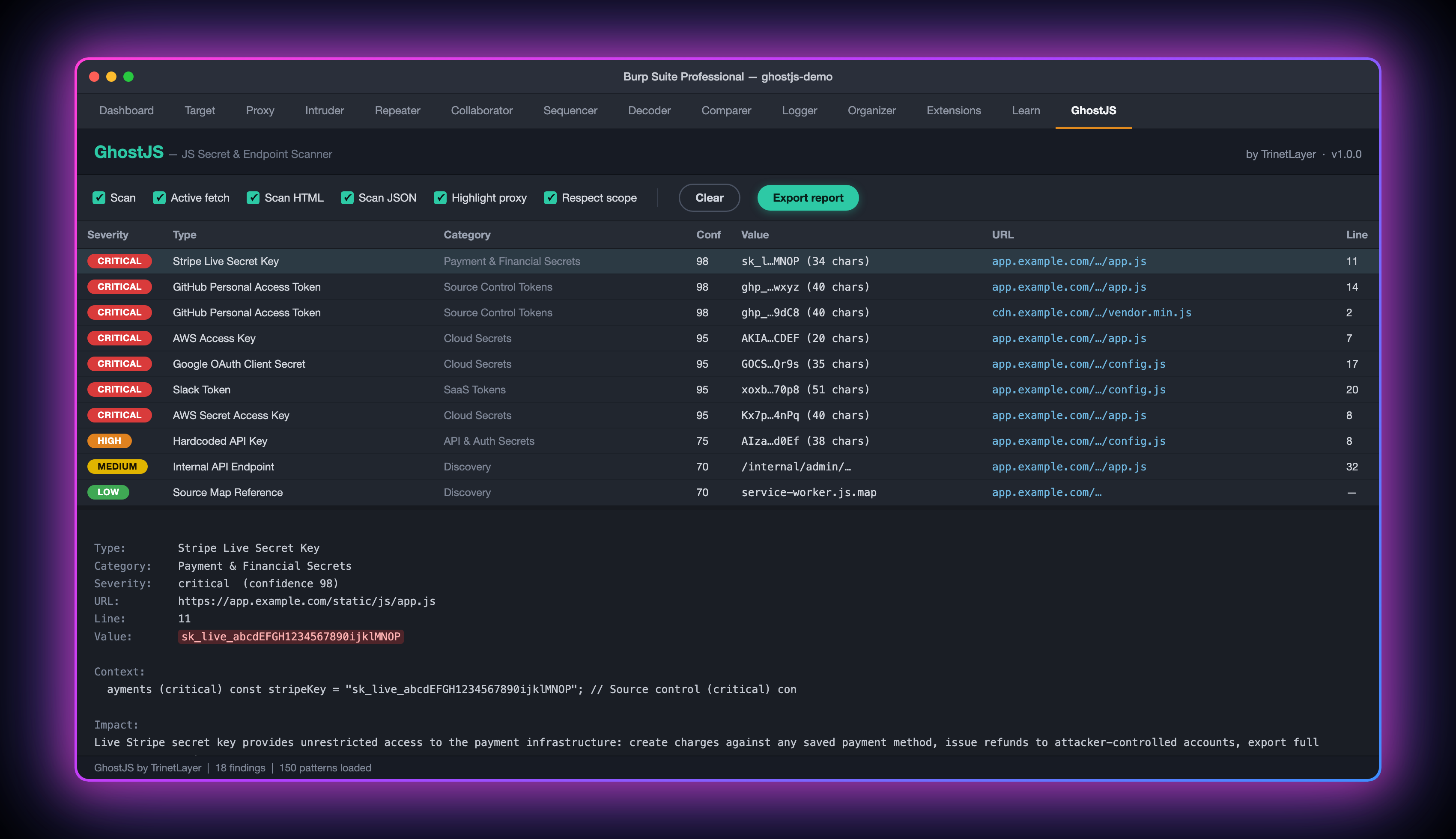
Load the extension, browse a target, and the GhostJS tab fills with findings — rendered in a clean, modern flat UI with colour-coded severity badges.

Real GhostJS output from the bundled test target (all secrets fake, hostnames swapped for example.com):
- GhostJS tab — toolbar toggles, then one row per unique secret with a rounded severity badge, type, category, confidence (0–100), masked value, URL and line. 8 CRITICAL rows here: AWS access + secret keys, Stripe live key, two GitHub PATs, Slack token, Google OAuth secret.
- Detail pane — click a row to see the full value, the surrounding code, a plain-English impact statement and numbered remediation steps. The table itself never prints a full secret (
sk_l…MNOP). - Proxy history highlighting — the same responses are coloured in Burp's HTTP history by worst severity (red = critical/high, orange = medium, yellow = low, gray = info) with a
GhostJS: N finding(s)note, so you spot leaky bundles without leaving Proxy. - Discovery rows (LOW/INFO) — source-map reference, S3 URL, and API paths pulled from the JS. These are references, not probed endpoints.
- Zero noise —
js/placeholders.js(AWS doc samples, a Stripe publishable key, i18n strings) produced no rows: the false-positive filter dropped every one of them.
Quick start
Requirements
- Burp Suite (Community or Professional)
- JDK 17+ — only needed if you build from source (Temurin works)
Option A — Download the ready-made jar (easiest)
- Grab
ghostjs.jarfrom the Releases page. - In Burp: Extensions ▸ Installed ▸ Add
- Extension type:
Java→ Select file:ghostjs.jar→ Next - Done — a GhostJS tab appears. Start browsing your target.
Option B — Build from source
git clone https://github.com/trinetlayer/Ghost-Js-Burp-Extension.git
cd Ghost-Js-Burp-Extension
./build.sh          # downloads the Montoya API, compiles, packages dist/ghostjs.jar
No Gradle or Maven required — ./build.sh handles everything. Then load dist/ghostjs.jar in Burp as in Option A.
Try it in 2 minutes
The repo ships a test target seeded with fake, format-valid secrets so you can see GhostJS work:
./test-site/serve.sh # serves http://localhost:8000- Load
dist/ghostjs.jarin Burp. - Open Burp's browser: Proxy ▸ Intercept ▸ Open Browser.
- Visit
http://localhost:8000/. - Open the GhostJS tab → ~18 findings across every severity. The samples in
placeholders.jsare correctly ignored, proving the false-positive filter works.
Controls (GhostJS tab toolbar)
| Toggle | What it does |
|---|---|
| Scan | Master on/off for passive scanning |
| Active fetch | Fetch referenced .js bundles not seen in proxy |
| Scan HTML | Also scan HTML bodies (inline secrets) |
| Scan JSON | Also scan JSON API responses |
| Highlight proxy | Colour matching entries in Proxy history |
| Respect scope | Only active-fetch in-scope / same-host URLs |
| Clear | Empty the findings table |
| Export report | Save all findings as Markdown |
Click any finding to see its value, impact, and remediation.
How it works
HTTP response ─► GhostJS (passive)
                   ├─ JS / HTML / JSON?
                   │     ├─ small body → scan inline → highlight the proxy row
                   │     └─ large body → background scan pool (browsing never blocks)
                   ├─ HTML? → extract <script src>/*.js → active-fetch + scan (with cookies)
                   └─ findings → GhostJS tab + Proxy highlight
Detection patterns are generated from TrinetLayer's GhostJS engine — a single source of truth, so the 150+ regexes never drift. Every scan is exception-isolated and time-bounded, so one pathological file can never hang or crash Burp.
Part of the TrinetLayer platform
GhostJS also lives on the web at app.trinetlayer.com — TrinetLayer's AI-powered JavaScript security platform. This Burp extension brings the same detection engine into your proxy; the web app adds:
- GhostJS deep scan — crawl a domain and its subdomains, fetch every JS bundle, and scan the whole attack surface, not just what you happened to browse.
- Validator — validate any key in seconds — paste any API key or secret and instantly see whether it's live: Verified / Unverified / Unknown, with format checks for 40+ key types and Shannon-entropy scoring.
- Continuous monitoring, PDF/JSON reports, and full API access.
Scope & responsible use
GhostJS is for authorized security testing only — your own apps, or targets you have explicit permission to test (a pentest engagement or an in-scope bug-bounty program). The findings are hints: always verify a secret is live and in scope before reporting it. Discovery findings (API endpoints, cloud-storage URLs, source-map references) are references extracted from JS, not probed — a 404 on a plain GET does not make them false positives.
Secrets found inside code comments are reported by design — a leaked key in a comment is still a leaked key.
Build & contribute
./build.sh→dist/ghostjs.jar(JDK 17+; downloads Montoya API automatically)gradle jaralso works if you prefer an IDE build- Patterns come from
export-patterns.mjs; run it to regenerateGeneratedPatterns.java - Deep-dive:
docs/TECHNICAL.md
📦 Full-Text Markdown Snapshot archived by Phying News · Original source: github.com/trinetlayer/Ghost-Js-Burp-Extension
---
id: 7519
canonical_url: "https://phying.com/item/7519"
title: "Ghost-Js-Burp-Extension: Burp Suite Extension to Detect Hardcoded Secrets & Endpoints in JavaScript"
type: "tool"
cve: null
cvss: null
severity: "unknown"
vendor: null
product: "Ghost-Js-Burp-Extension"
affected_versions: null
source_domain: "github.com"
source_url: "https://github.com/trinetlayer/Ghost-Js-Burp-Extension"
published_at: "2026-08-31T23:54:07Z"
snapshot_at: "2026-10-26T05:56:00Z"
archived_by: "Phying News (https://phying.com/item/7519)"
lang: "en"
---
# 👻 GhostJS
### Find hardcoded secrets & hidden endpoints in JavaScript — right inside Burp Suite.
*Source: [github.com/trinetlayer/Ghost-Js-Burp-Extension](https://github.com/trinetlayer/Ghost-Js-Burp-Extension) · Published: 2026-08-31T23:54:07Z*
A Burp Suite extension by **[TrinetLayer](https://github.com/trinetlayer)** that passively scans every JavaScript, HTML, and JSON response for **150+ kinds of secrets** (API keys, tokens, cloud credentials, private keys) and maps hidden **API endpoints** — automatically, as you browse.
`Java` · `Montoya API` · `150+ detection patterns` · `zero config`
---
## What it does
- **150+ secret patterns** — AWS / GCP / Azure keys, Stripe / PayPal / Razorpay, GitHub & GitLab tokens, JWTs, Firebase, Slack, private keys, database URIs, and more.
- **Endpoint discovery** — pulls API paths, cloud-storage URLs, and source-map references out of JS to expand your attack surface.
- **Automatic & passive** — scans traffic already flowing through Burp. No buttons to press.
- **Active fetch** — grabs `<script src>` bundles a page references but didn't load, and scans those too, replaying your live session cookies.
- **Smart, low-noise** — a false-positive filter suppresses doc samples, placeholders, and public-by-design keys, so you see real findings.
- **Highlights in Proxy history** plus a dedicated **GhostJS tab** with impact, remediation, and one-click Markdown export.
- **Non-blocking** — large bundles are scanned in the background; your browsing never lags.
---
## Screenshot
> Load the extension, browse a target, and the **GhostJS** tab fills with findings — rendered in a clean, modern flat UI with colour-coded severity badges.
[](https://github.com/trinetlayer/Ghost-Js-Burp-Extension/blob/main/docs/ghostjs-findings.png)
Real GhostJS output from the bundled test target (all secrets fake, hostnames swapped for `example.com`):
- **GhostJS tab** — toolbar toggles, then one row per unique secret with a rounded severity badge, type, category, confidence (0–100), masked value, URL and line. 8 CRITICAL rows here: AWS access + secret keys, Stripe live key, two GitHub PATs, Slack token, Google OAuth secret.
- **Detail pane** — click a row to see the full value, the surrounding code, a plain-English impact statement and numbered remediation steps. The table itself never prints a full secret (`sk_l…MNOP`).
- **Proxy history highlighting** — the same responses are coloured in Burp's HTTP history by worst severity (red = critical/high, orange = medium, yellow = low, gray = info) with a `GhostJS: N finding(s)` note, so you spot leaky bundles without leaving Proxy.
- **Discovery rows** (LOW/INFO) — source-map reference, S3 URL, and API paths pulled from the JS. These are references, not probed endpoints.
- **Zero noise** — `js/placeholders.js` (AWS doc samples, a Stripe *publishable* key, i18n strings) produced no rows: the false-positive filter dropped every one of them.
---
## Quick start
### Requirements
- **Burp Suite** (Community or Professional)
- **JDK 17+** — only needed if you build from source ([Temurin](https://adoptium.net/) works)
### Option A — Download the ready-made jar (easiest)
1. Grab `ghostjs.jar` from the [**Releases**](https://github.com/trinetlayer/Ghost-Js-Burp-Extension/releases) page.
2. In Burp: **Extensions ▸ Installed ▸ Add**
3. **Extension type:** `Java` → **Select file:** `ghostjs.jar` → **Next**
4. Done — a **GhostJS** tab appears. Start browsing your target.
### Option B — Build from source
```bash
git clone https://github.com/trinetlayer/Ghost-Js-Burp-Extension.git
cd Ghost-Js-Burp-Extension
./build.sh # downloads the Montoya API, compiles, packages dist/ghostjs.jar
```
No Gradle or Maven required — `./build.sh` handles everything. Then load `dist/ghostjs.jar` in Burp as in Option A.
---
## Try it in 2 minutes
The repo ships a test target seeded with **fake, format-valid** secrets so you can see GhostJS work:
```bash
./test-site/serve.sh # serves http://localhost:8000
```
1. Load `dist/ghostjs.jar` in Burp.
2. Open Burp's browser: **Proxy ▸ Intercept ▸ Open Browser**.
3. Visit `http://localhost:8000/`.
4. Open the **GhostJS** tab → ~18 findings across every severity. The samples in `placeholders.js` are correctly ignored, proving the false-positive filter works.
---
## Controls (GhostJS tab toolbar)
| Toggle | What it does |
| --- | --- |
| **Scan** | Master on/off for passive scanning |
| **Active fetch** | Fetch referenced `.js` bundles not seen in proxy |
| **Scan HTML** | Also scan HTML bodies (inline secrets) |
| **Scan JSON** | Also scan JSON API responses |
| **Highlight proxy** | Colour matching entries in Proxy history |
| **Respect scope** | Only active-fetch in-scope / same-host URLs |
| **Clear** | Empty the findings table |
| **Export report** | Save all findings as Markdown |
Click any finding to see its **value, impact, and remediation**.
---
## How it works
```
HTTP response ─► GhostJS (passive)
├─ JS / HTML / JSON?
│ ├─ small body → scan inline → highlight the proxy row
│ └─ large body → background scan pool (browsing never blocks)
├─ HTML? → extract <script src>/*.js → active-fetch + scan (with cookies)
└─ findings → GhostJS tab + Proxy highlight
```
Detection patterns are **generated from TrinetLayer's GhostJS engine** — a single source of truth, so the 150+ regexes never drift. Every scan is exception-isolated and time-bounded, so one pathological file can never hang or crash Burp.
---
## Part of the TrinetLayer platform
GhostJS also lives on the web at **[app.trinetlayer.com](https://app.trinetlayer.com)** — TrinetLayer's AI-powered JavaScript security platform. This Burp extension brings the same detection engine into your proxy; the web app adds:
- **GhostJS deep scan** — crawl a domain and its subdomains, fetch every JS bundle, and scan the whole attack surface, not just what you happened to browse.
- **[Validator](https://validator.trinetlayer.com/) — validate any key in seconds** — paste any API key or secret and instantly see whether it's live: **Verified / Unverified / Unknown**, with format checks for 40+ key types and Shannon-entropy scoring.
- Continuous monitoring, PDF/JSON reports, and full API access.
---
## Scope & responsible use
GhostJS is for **authorized security testing only** — your own apps, or targets you have explicit permission to test (a pentest engagement or an in-scope bug-bounty program). The findings are hints: always verify a secret is live and in scope before reporting it. Discovery findings (API endpoints, cloud-storage URLs, source-map references) are references extracted from JS, not probed — a 404 on a plain GET does not make them false positives.
> Secrets found inside code **comments are reported** by design — a leaked key in a comment is still a leaked key.
---
## Build & contribute
- `./build.sh` → `dist/ghostjs.jar` (JDK 17+; downloads Montoya API automatically)
- `gradle jar` also works if you prefer an IDE build
- Patterns come from `export-patterns.mjs`; run it to regenerate `GeneratedPatterns.java`
- Deep-dive: [`docs/TECHNICAL.md`](https://github.com/trinetlayer/Ghost-Js-Burp-Extension/blob/main/docs/TECHNICAL.md)
---
> 📦 **Full-Text Markdown Snapshot** archived by [Phying News](https://phying.com/item/7519) · Original source: [github.com/trinetlayer/Ghost-Js-Burp-Extension](https://github.com/trinetlayer/Ghost-Js-Burp-Extension)