Introducing Neo Triage
Summary
- Collected
📦 Full-Text Content Snapshot
R2 Archive · Full Article PreservedPublished on: 2026-10-27 · Source: projectdiscovery.io
Today we're releasing Neo Triage, an autonomous engine for vulnerability triage. While other tools rank your backlog, Neo clears it. It ingests the reports coming in from your scanners, pentesters, and bug bounty researchers, tests each one against your environment, and tells you which ones are real.
It's available today on every Neo plan, including Free, and runs in our cloud, in your own sandboxes, or on-prem.
Sign up now to tryTalk to our expert
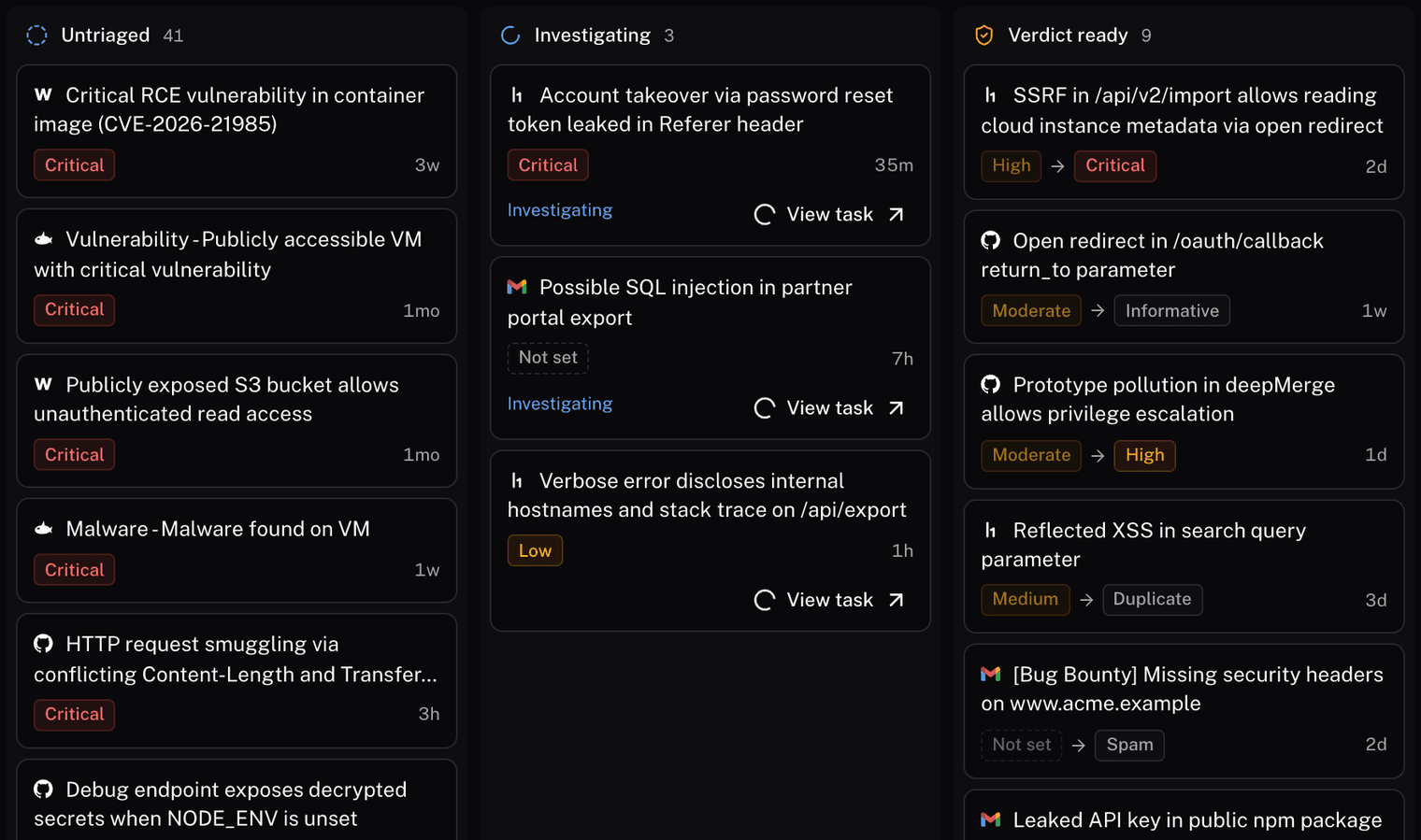
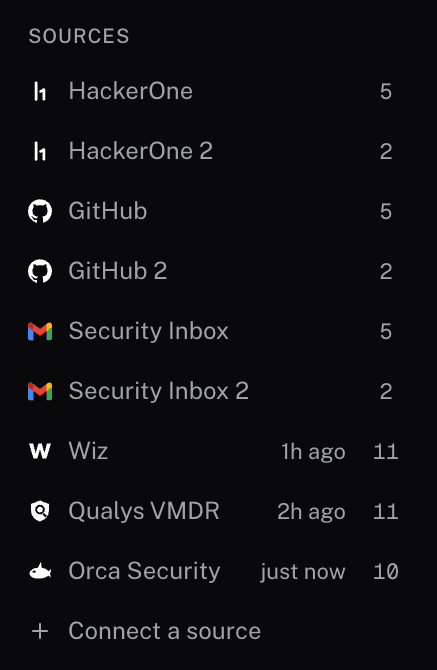
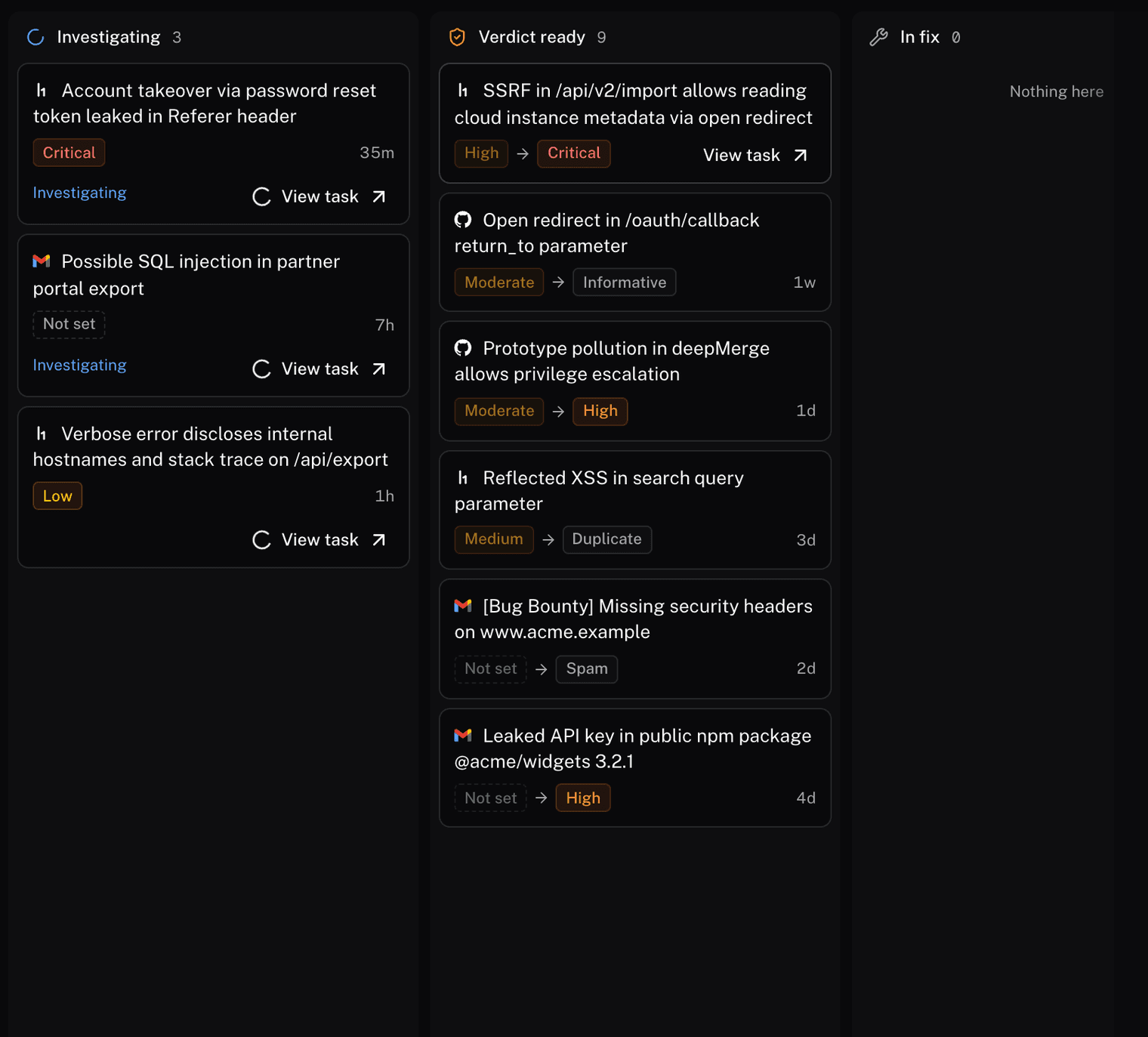
Every source in one place, from untriaged to verdict ready.
The bottleneck moved to triage
Finding vulnerabilities got cheap. AI agents probe applications overnight, researchers point models at bug bounty scopes, and scanners ship a check the day a CVE drops. Every one of those reports still ends with a person reproducing it by hand, which takes 15 minutes to four hours per finding. The backlog grows faster than any team can hire, and the few findings that matter sit inside it until someone checks.
Most triage tooling stops at ranking. A scanner scores the finding, a platform prioritizes it, an AI assistant sorts it by how severe it sounds. The list gets better ordered, and it stays the same length, because nothing in it has been tested.
Static triage
Traditional triage is a classifier. It takes what is publicly known about the vulnerability: the CVSS score, the EPSS probability, whether an exploit is published, the version string the scanner matched. It adds what the asset inventory says about the host, usually a tag for internet-facing or holds customer data. A weighted formula turns those into a risk score, and the score sets the order of the queue.
The weakness is in the inputs. None of them come from the running system. The score cannot know that the vulnerable code path is never called, that a WAF rule already blocks the request, that the host sits behind an auth layer the scanner never saw, or that the reporter's proof of concept skips a step.
A sorted backlog is the same backlog. Someone still opens each finding, reproduces it, and decides, and the score did nothing to shorten that.
Dynamic triage
Neo reproduces the finding instead. It opens an isolated sandbox and loads the context for the asset: the application and its APIs, the docs, the network and identity around it, and every prior finding on it. It reads the report, writes down the claim and the exact inputs in the proof of concept, rewrites the reproduction as its own script, and runs it against the real asset.
Each class of bug needs a different instrument to settle it, so the sandbox carries several.
- Browser verification. XSS and open redirects are confirmed in a real browser: a random token in the payload has to fire in a dialog or the console, or the page has to land on another domain. Internal targets use a browser inside the sandbox.
- Out-of-band checks. Callback endpoints that record any HTTP hit, DNS rebinding subdomains, hosted DTDs for XXE, and gopher payloads and canaries for SSRF against internal services.
- Injection context. Where the input lands, HTML, a script block, or an attribute, is worked out before a payload is built.
- Disposable mailboxes. One-time codes and reset links are pulled out of the mail a flow sends.
- Scanner output is a lead, not proof. Injection, XSS, CSRF, and authorization claims are each reproduced with curl, Nuclei, or a script written for the case.
- No inferred links. A callback from a blind probe is not SSRF on its own, and every link in a chain is demonstrated or labeled untested.
Because the run has the asset's context, it can go further than the report did. A researcher rates an SSRF High. Neo follows the redirect to the metadata service, reads the role credentials it returns, and finds that the role can read customer uploads. The finding comes back Critical, with the chain as evidence. The reverse happens too: a 9.8 that reproduces on nothing you run comes back closed, with the attempts that ruled it out.
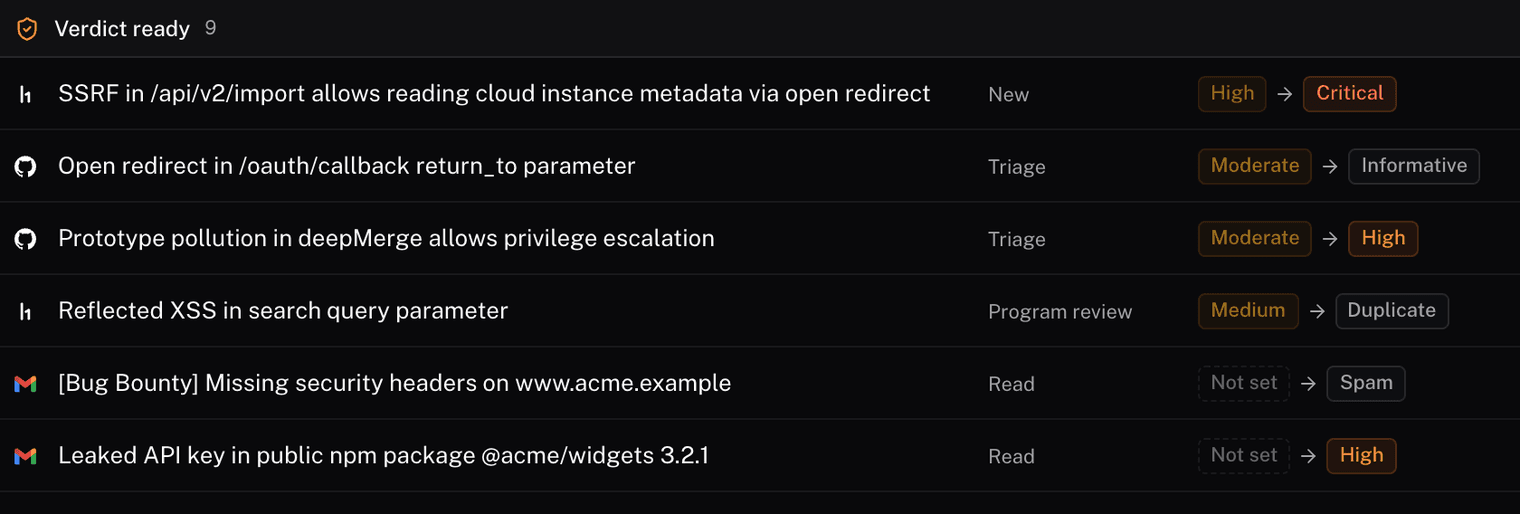
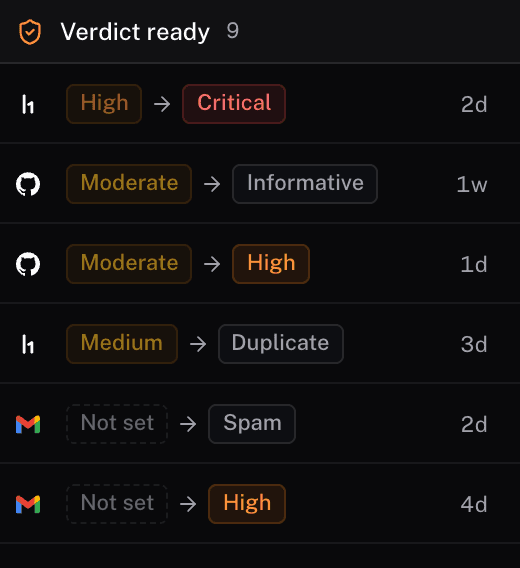
Source severity on the left, Neo's call after testing on the right.
Every report ends with a verdict: valid, with the severity Neo measured; likely duplicate, with the original it matches; or informative, not applicable, or spam, with the reasoning. A reviewer accepts, marks duplicate, or declines in one keystroke, and the activity log records who decided what. Insights shows the backlog by week and, at the current rate of closure, when it reaches zero.
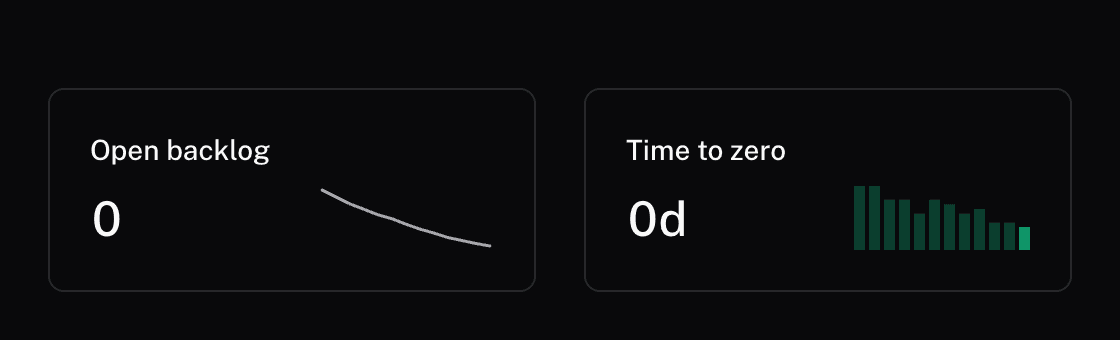
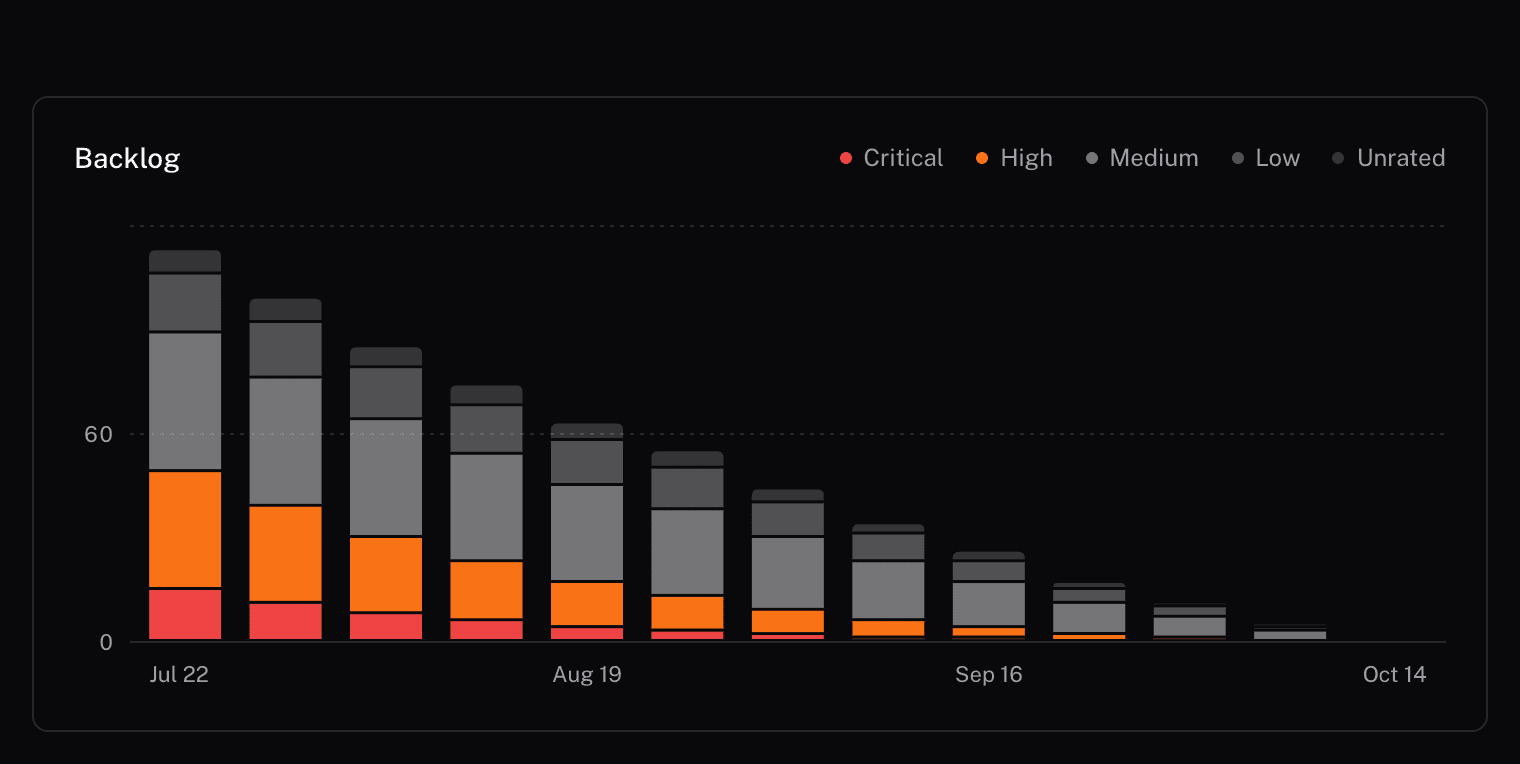
The backlog and how fast it's shrinking, by severity.
What Neo does with every report
Neo handles the full triage loop, from intake to the retest.
- Connects to the tools you already use. HackerOne, GitHub security advisories, and a security mailbox connect natively. For scanners and anything else with an API, paste its API docs or a curl example and Neo sets up the connection, maps the fields, and syncs it on a schedule.
- Puts your whole backlog in one place. Every report from every source on one board, moving through Untriaged, Investigating, Verdict ready, In fix, and Closed.
- Rates severity from the run. Neo's severity sits next to the one the source gave, so a change is visible at a glance.
- Flags duplicates. The same root cause on the same endpoint, reported through three sources, comes back as a likely duplicate with the original cited. A reviewer merges it with one key.
- Closes the noise. Reports that don't hold up come back as informative, not applicable, or spam, with the reasoning, and close with one key.
- Hands you proof and a reply. Confirmed issues come with the analysis, the requests and responses that proved it, the severity, and a reply to the reporter you can copy and send.
- Retests the fix. Link the pull request, and once it ships, one click reruns the original reproduction against the patched target and records fixed, not fixed, or blocked.
- Shows which sources to trust. Insights tracks each source's confirmed and false-positive rate, so you know which queue to work first.
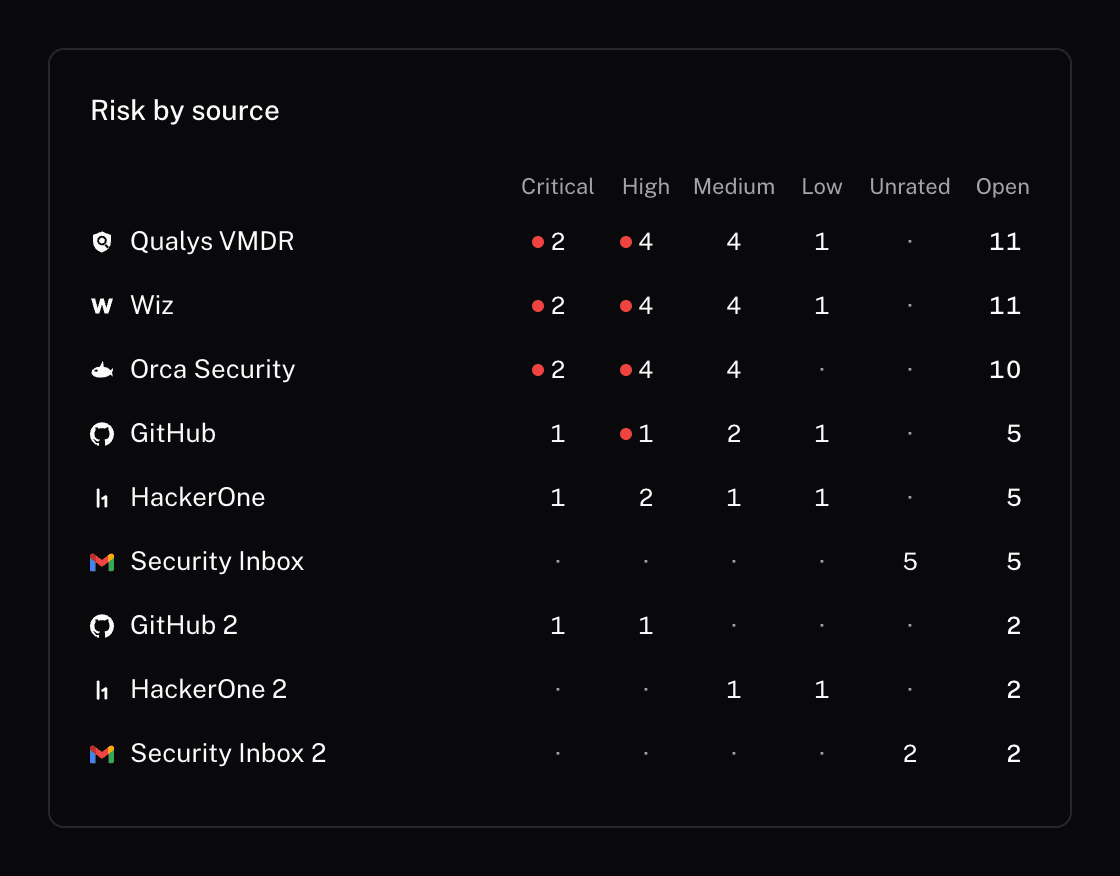
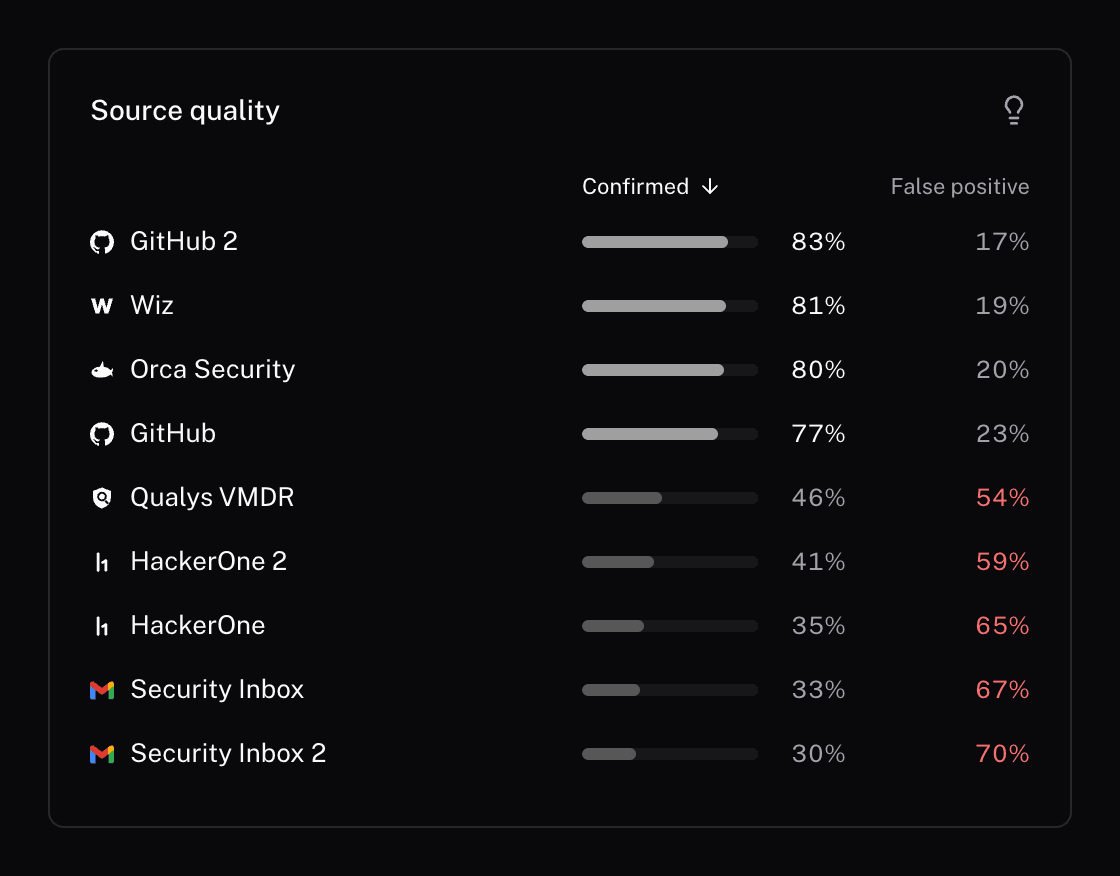
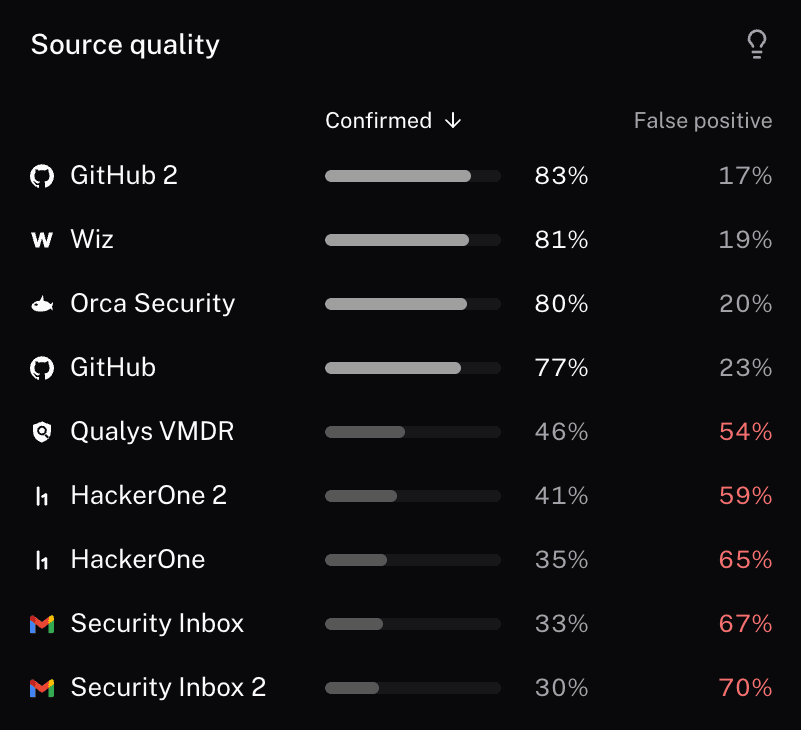
Neo tracks how often each source's reports actually hold up.
A report, start to finish
Every finding opens in a sheet with three tabs.
- Original report: the report as it came in, with the program or repository, the reporter, the severity the source gave it, and the CVE and CVSS where there is one.
- Triage result: Neo's verdict, the severity it set and who set it, the analysis with the evidence and the request that proved it, and the suggested reply.
- Activity: who did what, from the report landing to the retest, each entry with an undo.
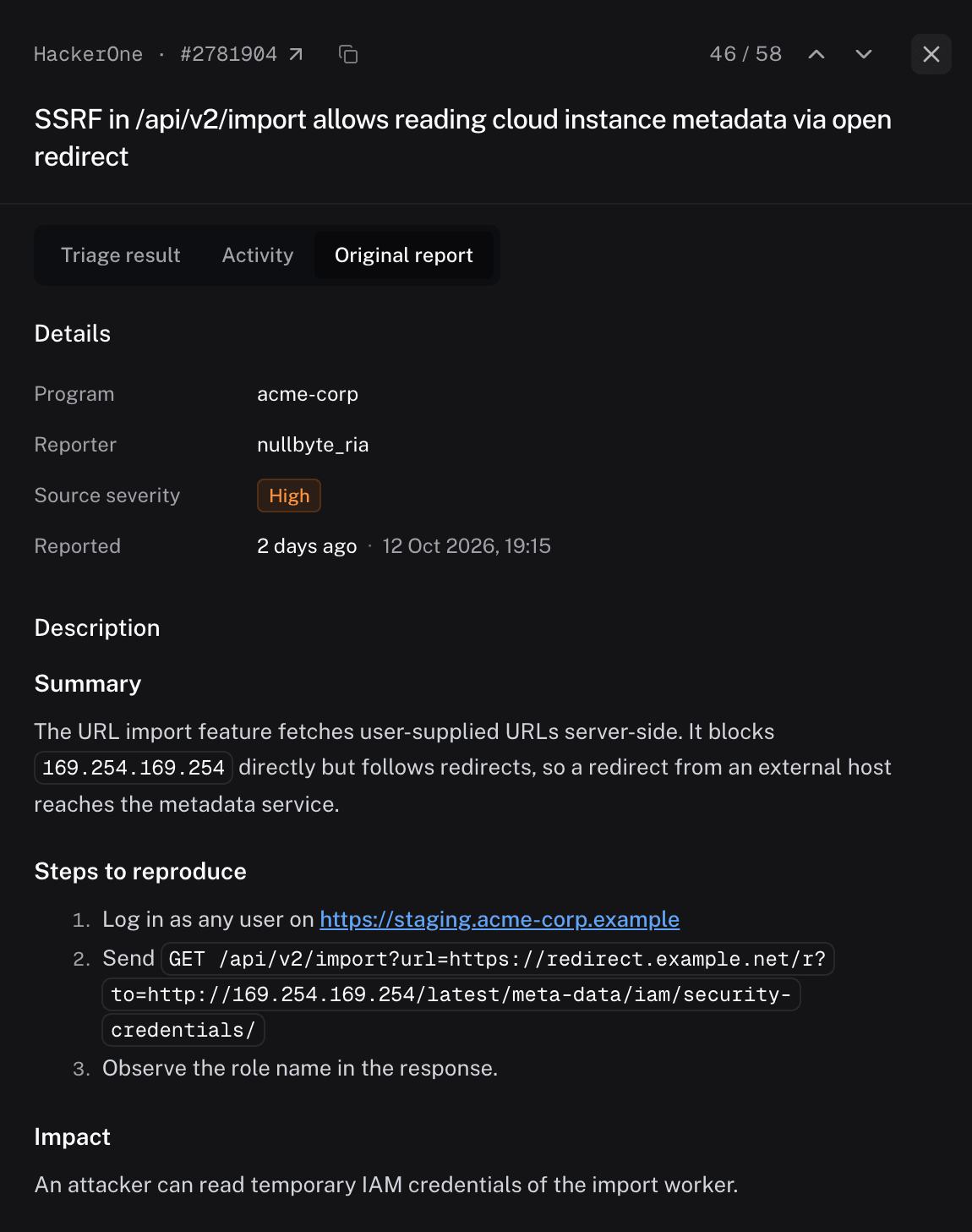
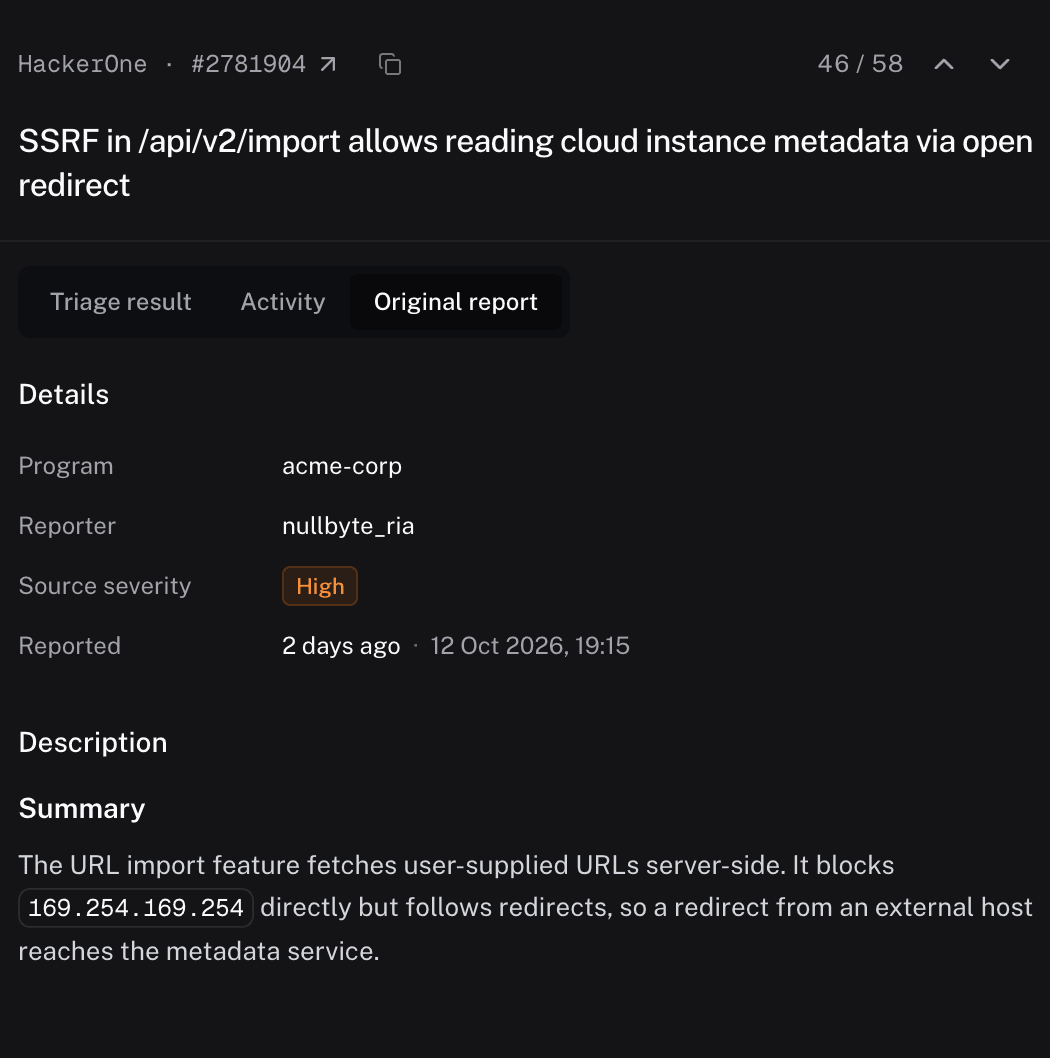
The original report, as Neo received it.
Auto triage
Turn on auto triage for a source and new reports are tested without anyone starting them. Neo checks the source on the interval you pick, every 15 minutes to once a day, takes up to 20 new findings at a time in priority order, and runs each one through the same sandbox reproduction as a manual triage. HackerOne can also trigger a run the moment a report lands. The rule runs as the person who saved it, with that person's access.
Each finding reaches the queue with its verdict, severity, and suggested reply already attached, logged as triaged by Auto triage. Your team opens Verdict ready instead of Untriaged.
Security
Neo runs tests against your assets, so every run sits inside these controls.
- Isolated sandbox. Each run executes in a sandbox, apart from your systems and from other teams. The shell holds no Neo credentials, and reporter code is never executed as submitted.
- Runtime classifier. Every command is checked before it runs: no data to unapproved destinations, no credential exposure, no destructive actions. A blocked command is refused with the rule, and the run continues.
- Hooks and policies. Your team adds rules at the org, repo, user, or task level: deny a command, rewrite it, or require a person to approve it first.
- Credentials. Secrets are encrypted and injected only at execution. The model and the shell see a placeholder, never the value, and a value that shows up in output is redacted.
- Zero data retention. On Neo's models every request runs under ZDR: nothing is kept by the provider or used for training. Bring your own key and your provider's terms apply.
- Your own infrastructure. Enterprise teams run the whole stack on-prem or in their own VPC, so reports, findings, and evidence never leave their platform.
Availability
Neo Triage is available today on every Neo plan. On the Free and pay-as-you-go plans it is free for a limited time. Enterprise teams get volume pricing based on the size of their backlog.
Getting started
Sign up at neo.projectdiscovery.io, connect your first source, and Neo starts working through your backlog. Setup details are in the docs.
Sign up now to tryTalk to our expert
📦 Full-Text Markdown Snapshot archived by Phying News · Original source: projectdiscovery.io
--- id: 10339 canonical_url: "https://phying.com/item/10339" title: "Introducing Neo Triage" type: "vulnerability" cve: null cvss: null severity: "unknown" vendor: null product: null affected_versions: null source_domain: "projectdiscovery.io" source_url: "https://projectdiscovery.io/blog/introducing-neo-triage" published_at: "2026-10-27T15:00:45Z" snapshot_at: "2026-10-27T15:00:45Z" archived_by: "Phying News (https://phying.com/item/10339)" lang: "en" --- # Introducing Neo Triage *Published on: 2026-10-27 · Source: [projectdiscovery.io](https://projectdiscovery.io/blog/introducing-neo-triage)* Today we're releasing Neo Triage, an autonomous engine for vulnerability triage. While other tools rank your backlog, Neo clears it. It ingests the reports coming in from your scanners, pentesters, and bug bounty researchers, tests each one against your environment, and tells you which ones are real. It's available today on every Neo plan, including Free, and runs in our cloud, in your own sandboxes, or on-prem. [Sign up now to try](https://neo.projectdiscovery.io/triage)[Talk to our expert](https://projectdiscovery.io/request-demo)   Every source in one place, from untriaged to verdict ready. ## The bottleneck moved to triage Finding vulnerabilities got cheap. AI agents probe applications overnight, researchers point models at bug bounty scopes, and scanners ship a check the day a CVE drops. Every one of those reports still ends with a person reproducing it by hand, which takes 15 minutes to four hours per finding. The backlog grows faster than any team can hire, and the few findings that matter sit inside it until someone checks. Most triage tooling stops at ranking. A scanner scores the finding, a platform prioritizes it, an AI assistant sorts it by how severe it sounds. The list gets better ordered, and it stays the same length, because nothing in it has been tested. ## Static triage Traditional triage is a classifier. It takes what is publicly known about the vulnerability: the CVSS score, the EPSS probability, whether an exploit is published, the version string the scanner matched. It adds what the asset inventory says about the host, usually a tag for internet-facing or holds customer data. A weighted formula turns those into a risk score, and the score sets the order of the queue. The weakness is in the inputs. None of them come from the running system. The score cannot know that the vulnerable code path is never called, that a WAF rule already blocks the request, that the host sits behind an auth layer the scanner never saw, or that the reporter's proof of concept skips a step. A sorted backlog is the same backlog. Someone still opens each finding, reproduces it, and decides, and the score did nothing to shorten that. ## Dynamic triage Neo reproduces the finding instead. It opens an isolated sandbox and loads the context for the asset: the application and its APIs, the docs, the network and identity around it, and every prior finding on it. It reads the report, writes down the claim and the exact inputs in the proof of concept, rewrites the reproduction as its own script, and runs it against the real asset. Each class of bug needs a different instrument to settle it, so the sandbox carries several. * **Browser verification.** XSS and open redirects are confirmed in a real browser: a random token in the payload has to fire in a dialog or the console, or the page has to land on another domain. Internal targets use a browser inside the sandbox. * **Out-of-band checks.** Callback endpoints that record any HTTP hit, DNS rebinding subdomains, hosted DTDs for XXE, and gopher payloads and canaries for SSRF against internal services. * **Injection context.** Where the input lands, HTML, a script block, or an attribute, is worked out before a payload is built. * **Disposable mailboxes.** One-time codes and reset links are pulled out of the mail a flow sends. * **Scanner output is a lead, not proof.** Injection, XSS, CSRF, and authorization claims are each reproduced with curl, Nuclei, or a script written for the case. * **No inferred links.** A callback from a blind probe is not SSRF on its own, and every link in a chain is demonstrated or labeled untested. Because the run has the asset's context, it can go further than the report did. A researcher rates an SSRF High. Neo follows the redirect to the metadata service, reads the role credentials it returns, and finds that the role can read customer uploads. The finding comes back Critical, with the chain as evidence. The reverse happens too: a 9.8 that reproduces on nothing you run comes back closed, with the attempts that ruled it out.   Source severity on the left, Neo's call after testing on the right. Every report ends with a verdict: valid, with the severity Neo measured; likely duplicate, with the original it matches; or informative, not applicable, or spam, with the reasoning. A reviewer accepts, marks duplicate, or declines in one keystroke, and the activity log records who decided what. Insights shows the backlog by week and, at the current rate of closure, when it reaches zero.   The backlog and how fast it's shrinking, by severity. ## What Neo does with every report Neo handles the full triage loop, from intake to the retest. * **Connects to the tools you already use.** HackerOne, GitHub security advisories, and a security mailbox connect natively. For scanners and anything else with an API, paste its API docs or a curl example and Neo sets up the connection, maps the fields, and syncs it on a schedule. * **Puts your whole backlog in one place.** Every report from every source on one board, moving through Untriaged, Investigating, Verdict ready, In fix, and Closed. * **Rates severity from the run.** Neo's severity sits next to the one the source gave, so a change is visible at a glance. * **Flags duplicates.** The same root cause on the same endpoint, reported through three sources, comes back as a likely duplicate with the original cited. A reviewer merges it with one key. * **Closes the noise.** Reports that don't hold up come back as informative, not applicable, or spam, with the reasoning, and close with one key. * **Hands you proof and a reply.** Confirmed issues come with the analysis, the requests and responses that proved it, the severity, and a reply to the reporter you can copy and send. * **Retests the fix.** Link the pull request, and once it ships, one click reruns the original reproduction against the patched target and records fixed, not fixed, or blocked. * **Shows which sources to trust.** Insights tracks each source's confirmed and false-positive rate, so you know which queue to work first.    Neo tracks how often each source's reports actually hold up. ## A report, start to finish Every finding opens in a sheet with three tabs. 1. Original report: the report as it came in, with the program or repository, the reporter, the severity the source gave it, and the CVE and CVSS where there is one. 2. Triage result: Neo's verdict, the severity it set and who set it, the analysis with the evidence and the request that proved it, and the suggested reply. 3. Activity: who did what, from the report landing to the retest, each entry with an undo.    The original report, as Neo received it. ## Auto triage Turn on auto triage for a source and new reports are tested without anyone starting them. Neo checks the source on the interval you pick, every 15 minutes to once a day, takes up to 20 new findings at a time in priority order, and runs each one through the same sandbox reproduction as a manual triage. HackerOne can also trigger a run the moment a report lands. The rule runs as the person who saved it, with that person's access. Each finding reaches the queue with its verdict, severity, and suggested reply already attached, logged as triaged by Auto triage. Your team opens Verdict ready instead of Untriaged. ## Security Neo runs tests against your assets, so every run sits inside these controls. * **Isolated sandbox.** Each run executes in a sandbox, apart from your systems and from other teams. The shell holds no Neo credentials, and reporter code is never executed as submitted. * **Runtime classifier.** Every command is checked before it runs: no data to unapproved destinations, no credential exposure, no destructive actions. A blocked command is refused with the rule, and the run continues. * **Hooks and policies.** Your team adds rules at the org, repo, user, or task level: deny a command, rewrite it, or require a person to approve it first. * **Credentials.** Secrets are encrypted and injected only at execution. The model and the shell see a placeholder, never the value, and a value that shows up in output is redacted. * **Zero data retention.** On Neo's models every request runs under ZDR: nothing is kept by the provider or used for training. Bring your own key and your provider's terms apply. * **Your own infrastructure.** Enterprise teams run the whole stack on-prem or in their own VPC, so reports, findings, and evidence never leave their platform. ## Availability Neo Triage is available today on every Neo plan. On the Free and pay-as-you-go plans it is free for a limited time. Enterprise teams get volume pricing based on the size of their backlog. ## Getting started Sign up at [neo.projectdiscovery.io](https://neo.projectdiscovery.io), connect your first source, and Neo starts working through your backlog. Setup details are in the [docs](https://docs.neo.projectdiscovery.io/use-cases/triage). [Sign up now to try](https://neo.projectdiscovery.io/triage)[Talk to our expert](https://projectdiscovery.io/request-demo) --- > 📦 **Full-Text Markdown Snapshot** archived by [Phying News](https://phying.com/item/10339) · Original source: [projectdiscovery.io](https://projectdiscovery.io/blog/introducing-neo-triage)