StrikeAgent AtkBrain-Flash: Autonomous AI Penetration Testing & Red Teaming Platform
Summary
Why it matters
- Published
- Collected
📦 Full-Text Content Snapshot
R2 Archive · Full Article Preserved
This project was developed by the Yean-Sec team to explore autonomous AI penetration testing capabilities, aiming to build a solution with authentic engineering philosophies rather than generic, templated AI wrappers.
While the overall platform may appear straightforward on the surface, it has undergone multiple rounds of rigorous real-world engagements and embodies extensive engineering effort. Crucial design details abound: solving the dilemma of "expanding the attack surface without losing focus or drifting off-target" alone required substantial refinement (in the Flash edition). Furthermore, to prevent AI-generated vulnerabilities from suffering from hallucination or exaggeration, the team engineered red-team secondary verification and secondary rating mechanisms, ensuring findings are what-you-see-is-what-you-get and directly actionable.
The team's internal Pro version has already been deployed across dozens of engagements and over a thousand authorized external targets, focusing entirely on external initial access.
Architecture
The console dispatches targets; the attack graph drives the autonomous execution loop. The agent executes a complete attack round before prompting the operator, asking for guidance only when encountering a blocker or reaching the cycle threshold; manual commands entered into the dialogue immediately interrupt the active round. Upon concluding an engagement, operational tactics are distilled back into the memory base. The runtime is powered by Pi, while the LLM provider is dynamically configured via settings JSON. Agent tests connect directly to real IPs by default; traffic routes through proxy pools only when explicitly configured and enabled.

UI Showcase
Platform Overview:

Home & Project Creation: Dual entry points for Agent Testing and CTF challenges. Targets can be input individually or imported in batches via .txt / .csv alongside contextual parameters. CTF challenges support Web, PWN, Reverse Engineering, Misc, and Cryptography categories with attachment uploads.

Project Console: Real-time attack graph, execution timeline, verified vulnerability feed, and interactive agent dialogue.

Vulnerability Base:

Delivery Reports
Report Template Sample:


Benchmark Leaderboard
Ranked #1 on Tsecbench v1 (StrikeAgent_AtkBrain-Flash, score: 97.89 / 100), the intelligent offensive-defensive security agent evaluation led by Tencent Security's Yunding Lab.

Security Hardening Efforts
To prevent unauthorized exposure, default installations conceal login pages, API endpoints, and plaintext secrets:
- Randomized Access Entry: An 8-character random path is written strictly to local
backend/data/security_entry(0600permissions); it is never exposed over the web or APIs. Runpython -m atkbrain.panelon the host to print the URL. - No Entry, No Subdirectory: Root
:2334/renders only a static introduction page;/login,/api,/.env, etc., unconditionally return HTTP 404. - Anti-Interception / Anti-Replay / Anti-Brute-Force: Browser encrypts authentication payloads via RSA-OAEP before POSTing; one-time tickets (120s TTL); rate limiting and IP/username lockouts.
- Credential Storage: Passwords hashed via Argon2id; local
admin_bootstrap.secret(0600) accessible only via host shell. - Session Protection:
HttpOnlycookies; no query tokens (?token=); Swagger documentation disabled; HTTPS on:2334by default.
Environment & Installation
Choose between Docker or a native Linux systemd setup. Docker packages the console, Pi, and standard recon utilities into containers. The native Linux setup runs via systemd without virtualization. Do not run both simultaneously on ports 2333 / 2334.
LLM models are not configured during installation. Once the console is running, configure Pi's model JSON via settings. .env stores only local port bindings and administrative secrets; do not store vendor API keys in .env. Persistent data lives under backend/data/ (gitignored), so upgrades or service reinstalls will not overwrite databases, entry paths, or saved model settings.
Docker Deployment
Requires Docker and Docker Compose. Execute from the repository root (containing compose.yaml and .env.example). Linux uses host networking; remote clients must be able to reach host port 2334. Docker Desktop on macOS lacks host networking, so append deploy/compose.mac.yaml to bind the console to 127.0.0.1.
git clone https://github.com/Yean-Sec/StrikeAgent_AtkBrain-Flash
cd StrikeAgent_AtkBrain-Flash
cp .env.example .env
# Default .env values suffice. Initial login: admin / admin (change required upon login).
# Do NOT enter model API keys here.

# Linux
docker compose -f compose.yaml -f deploy/compose.build.yaml up -d --build --wait

# macOS
# docker compose -f compose.yaml -f deploy/compose.build.yaml -f deploy/compose.mac.yaml up -d --build --wait
--build builds image strikeagent-atkbrain-flash:console from Dockerfile.console, while --wait holds until healthchecks pass. Containers created: strikeagent-atkbrain-flash (API) and strikeagent-atkbrain-caddy (HTTPS).
docker compose -f compose.yaml ps
docker compose -f compose.yaml exec atkbrain python -m atkbrain.panel
# Prints the random https entry URL and active password (visible only on this host)

# Upgrade: pull latest code in repository root and rebuild
docker compose -f compose.yaml -f deploy/compose.build.yaml up -d --build --wait

# Stop services
docker compose -f compose.yaml -f deploy/compose.build.yaml down
Native Linux Deployment
Runs directly on Linux without containers. Requirements: root privileges, systemd, Python 3.11+ (/usr/bin/python3), Node.js 20+, npm, OpenSSL. System units bind strictly to system python3; dependencies must be installed into this interpreter rather than an unlinked venv.
Debian / Ubuntu:
sudo apt-get update
sudo apt-get install -y python3 python3-pip python3-venv nodejs npm openssl ca-certificates   gcc pkg-config libffi-dev   libcairo2 libpango-1.0-0 libpangocairo-1.0-0 libgdk-pixbuf-2.0-0
RHEL / TencentOS:
sudo dnf install -y python3 python3-pip nodejs npm openssl ca-certificates gcc pkgconf-pkg-config libffi-devel cairo pango gdk-pixbuf2Ensure Node.js is version 20+. Then install Python dependencies, frontend, and Pi:
git clone https://github.com/Yean-Sec/StrikeAgent_AtkBrain-Flash
cd StrikeAgent_AtkBrain-Flash
cp .env.example .env

python3 -m pip install -r backend/requirements.txt
npm install -g @earendil-works/pi-coding-agent
cd frontend && npm install && cd ..

sudo scripts/atkbrain-up.sh
atkbrain-up.sh provisions and starts two systemd units:
atkbrain-flash-backend.service: API service on2333atkbrain-flash-frontend.service: Self-signed HTTPS on2334, reverse proxying to2333
scripts/atkbrain-panel.sh
# Equivalent to: cd backend && python3 -m atkbrain.panel

sudo scripts/atkbrain-backend.sh status
sudo scripts/atkbrain-frontend.sh status
sudo scripts/atkbrain-backend.sh logs
sudo scripts/atkbrain-frontend.sh logs
Logs are recorded in backend/data/logs/backend.log and frontend.log.
Upgrading: Pull new commits, reinstall dependencies, and restart services:
python3 -m pip install -r backend/requirements.txt
cd frontend && npm install && npm run build && cd ..
sudo scripts/atkbrain-backend.sh restart
sudo scripts/atkbrain-frontend.sh restart
To stop: sudo scripts/atkbrain-backend.sh stop and sudo scripts/atkbrain-frontend.sh stop. To remove units while preserving data, execute uninstall on both scripts.
Note on tools: The Docker image includes standard network reconnaissance tools. Native Linux instances provide only the console and Pi runtime; utilities like nmap must be installed separately on the host and available in root's PATH.
Post-Deployment Workflow
Open the HTTPS URL printed by panel in your browser (accept the self-signed certificate). The console is on :2334, and API on :2333. Bare :2334/ displays the overview page; append the generated random path to access the login prompt.
Login with initial credentials admin / admin, and update your password immediately when prompted.
Configure LLM Models: Navigate to Settings → Models, select OpenAI or Anthropic, and configure the model name, Base URL, and API Key. OpenAI uses Chat Completions; Anthropic uses Messages API. Settings are saved to backend/data/pi-models.json. Click "Test Connectivity" to send a minimal verification request.
Password / Entry Recovery: Rerun panel. If plaintext backups are missing, configure ATKBRAIN_ADMIN_PASSWORD and ATKBRAIN_ADMIN_PASSWORD_RESET=1 in .env, run docker compose ... up -d or sudo scripts/atkbrain-backend.sh restart, verify access, and revert RESET to false.
License & Disclaimer
AGPL-3.0-only — Free for personal and open-source use. Commercial licensing inquiries: gavenmiya@outlook.com. Unauthorized commercial distribution is strictly prohibited. See LICENSE for full legal terms.
Authorized Engagements Only. Use of this software is strictly restricted to explicitly authorized targets. Users assume all responsibility for their operations. The platform hardcodes testing blocks against critical domains (e.g. .gov, .edu) and enforces strict guardrail filters. The platform does not bundle bypasses, proxy relays, or evasion payloads!
📦 Full-Text Markdown Snapshot archived by Phying News · Original source: github.com
--- id: 7535 canonical_url: "https://phying.com/item/7535" source_url: "https://github.com/Yean-Sec/StrikeAgent_AtkBrain-Flash" source_domain: "github.com" title: "StrikeAgent AtkBrain-Flash: Autonomous AI Penetration Testing & Red Teaming Platform" type: "tool" severity: "unknown" cve: null published_at: "2026-09-07T15:15:02Z" lang: "en" --- # StrikeAgent AtkBrain-Flash: Autonomous AI Penetration Testing & Red Teaming Platform [](https://github.com/Yean-Sec/StrikeAgent_AtkBrain-Flash/blob/main/docs/assets/coined-triad.gif) This project was developed by the Yean-Sec team to explore autonomous AI penetration testing capabilities, aiming to build a solution with authentic engineering philosophies rather than generic, templated AI wrappers. While the overall platform may appear straightforward on the surface, it has undergone multiple rounds of rigorous real-world engagements and embodies extensive engineering effort. Crucial design details abound: solving the dilemma of "expanding the attack surface without losing focus or drifting off-target" alone required substantial refinement (in the Flash edition). Furthermore, to prevent AI-generated vulnerabilities from suffering from hallucination or exaggeration, the team engineered red-team secondary verification and secondary rating mechanisms, ensuring findings are what-you-see-is-what-you-get and directly actionable. The team's internal Pro version has already been deployed across dozens of engagements and over a thousand authorized external targets, focusing entirely on external initial access. ## Architecture The console dispatches targets; the attack graph drives the autonomous execution loop. The agent executes a complete attack round before prompting the operator, asking for guidance only when encountering a blocker or reaching the cycle threshold; manual commands entered into the dialogue immediately interrupt the active round. Upon concluding an engagement, operational tactics are distilled back into the memory base. The runtime is powered by Pi, while the LLM provider is dynamically configured via settings JSON. Agent tests connect directly to real IPs by default; traffic routes through proxy pools only when explicitly configured and enabled. [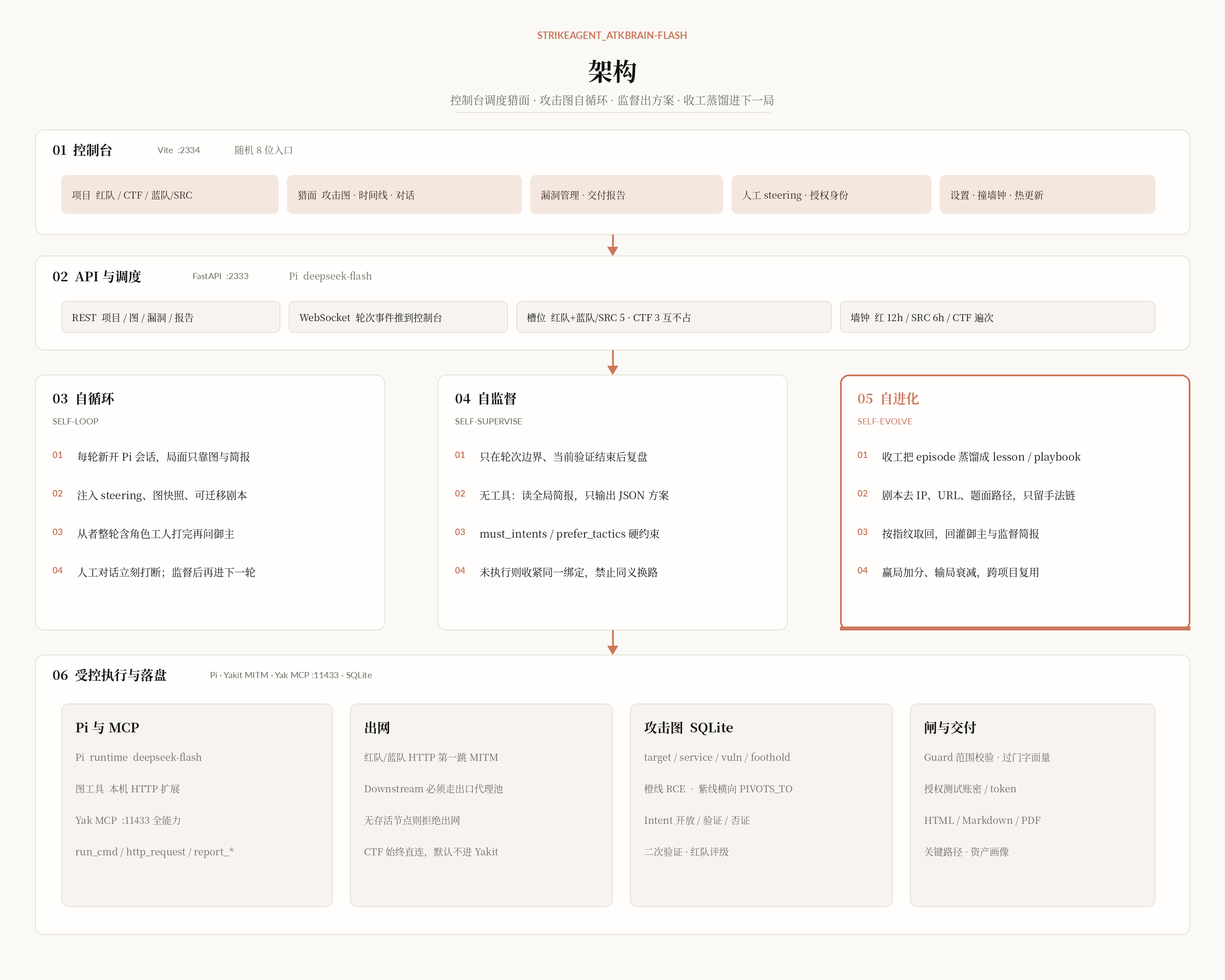](https://github.com/Yean-Sec/StrikeAgent_AtkBrain-Flash/blob/main/docs/assets/architecture.png) ## UI Showcase **Platform Overview:** [](https://github.com/Yean-Sec/StrikeAgent_AtkBrain-Flash/blob/main/docs/assets/main.gif) **Home & Project Creation:** Dual entry points for Agent Testing and CTF challenges. Targets can be input individually or imported in batches via `.txt` / `.csv` alongside contextual parameters. CTF challenges support Web, PWN, Reverse Engineering, Misc, and Cryptography categories with attachment uploads. [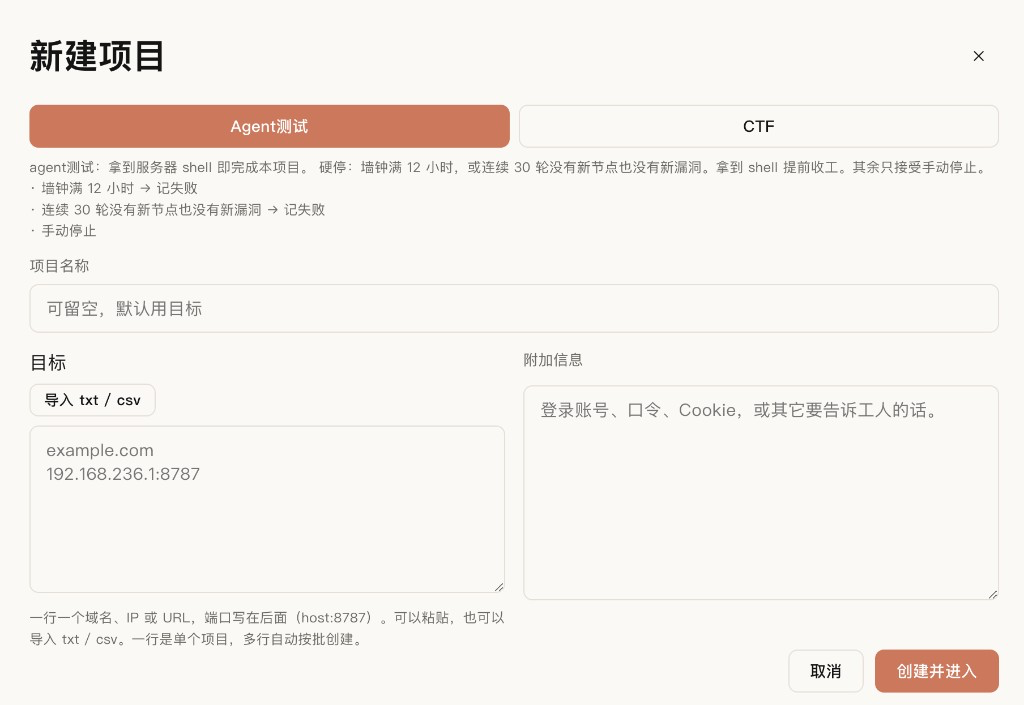](https://github.com/Yean-Sec/StrikeAgent_AtkBrain-Flash/blob/main/docs/assets/create-project.png) **Project Console:** Real-time attack graph, execution timeline, verified vulnerability feed, and interactive agent dialogue. [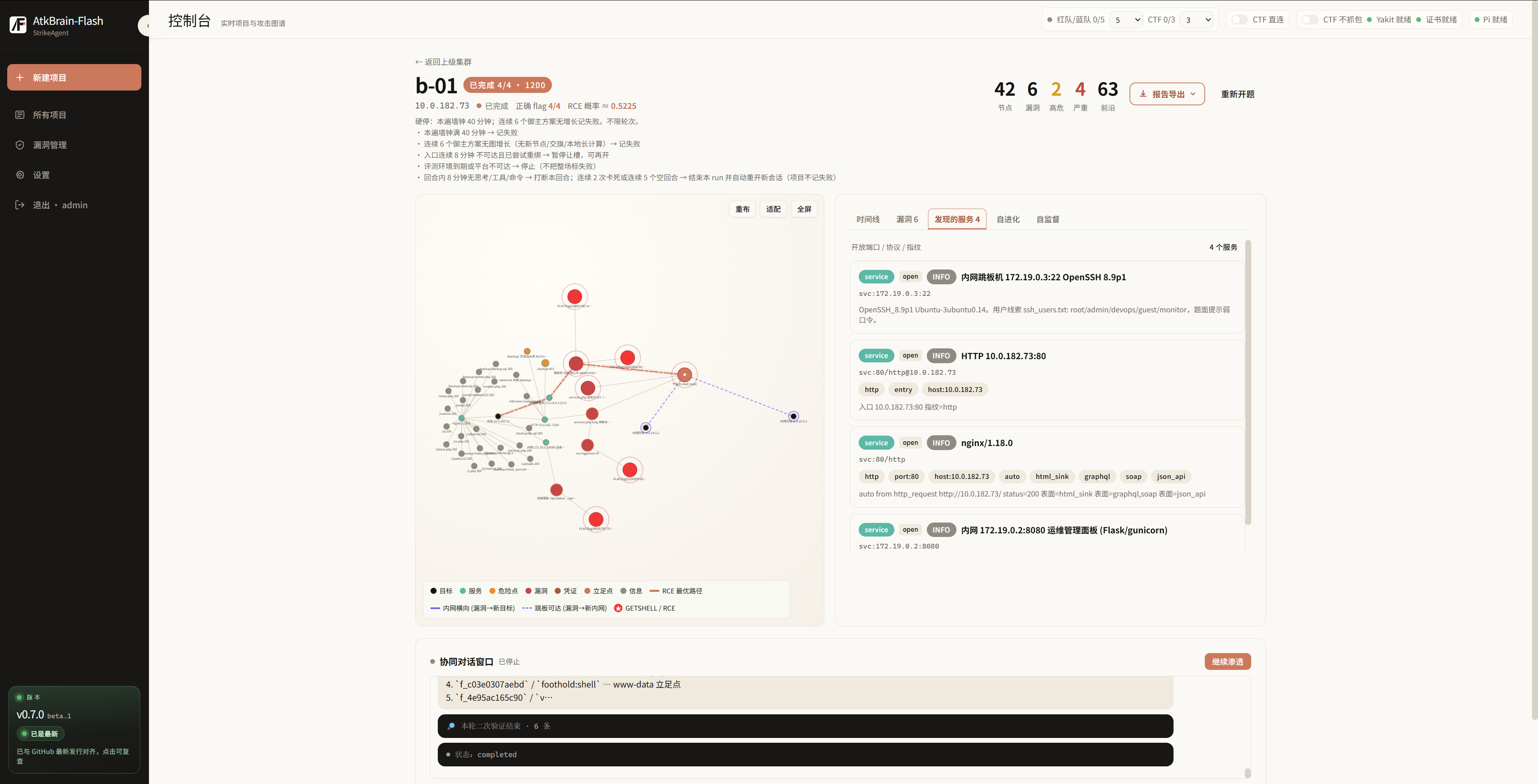](https://github.com/Yean-Sec/StrikeAgent_AtkBrain-Flash/blob/main/docs/assets/ScreenShot_2026-09-19_230912_075.png) **Vulnerability Base:** [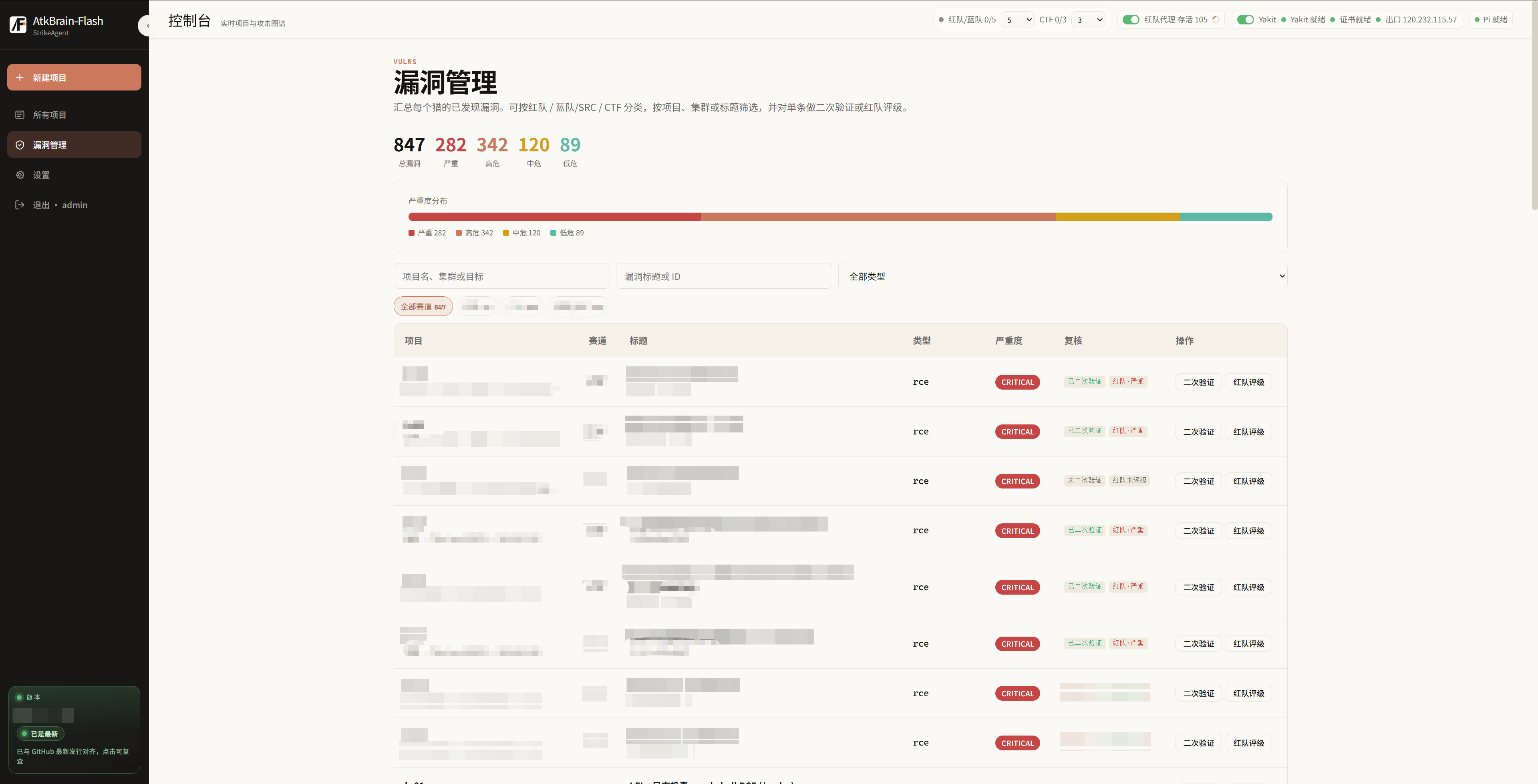](https://github.com/Yean-Sec/StrikeAgent_AtkBrain-Flash/blob/main/docs/assets/ScreenShot_2026-09-19_235824_031.png) ## Delivery Reports *Report Template Sample:* [Open Interactive HTML Report](https://github.com/Yean-Sec/StrikeAgent_AtkBrain-Flash/blob/main/docs/demo/intranet-lab-report.html) [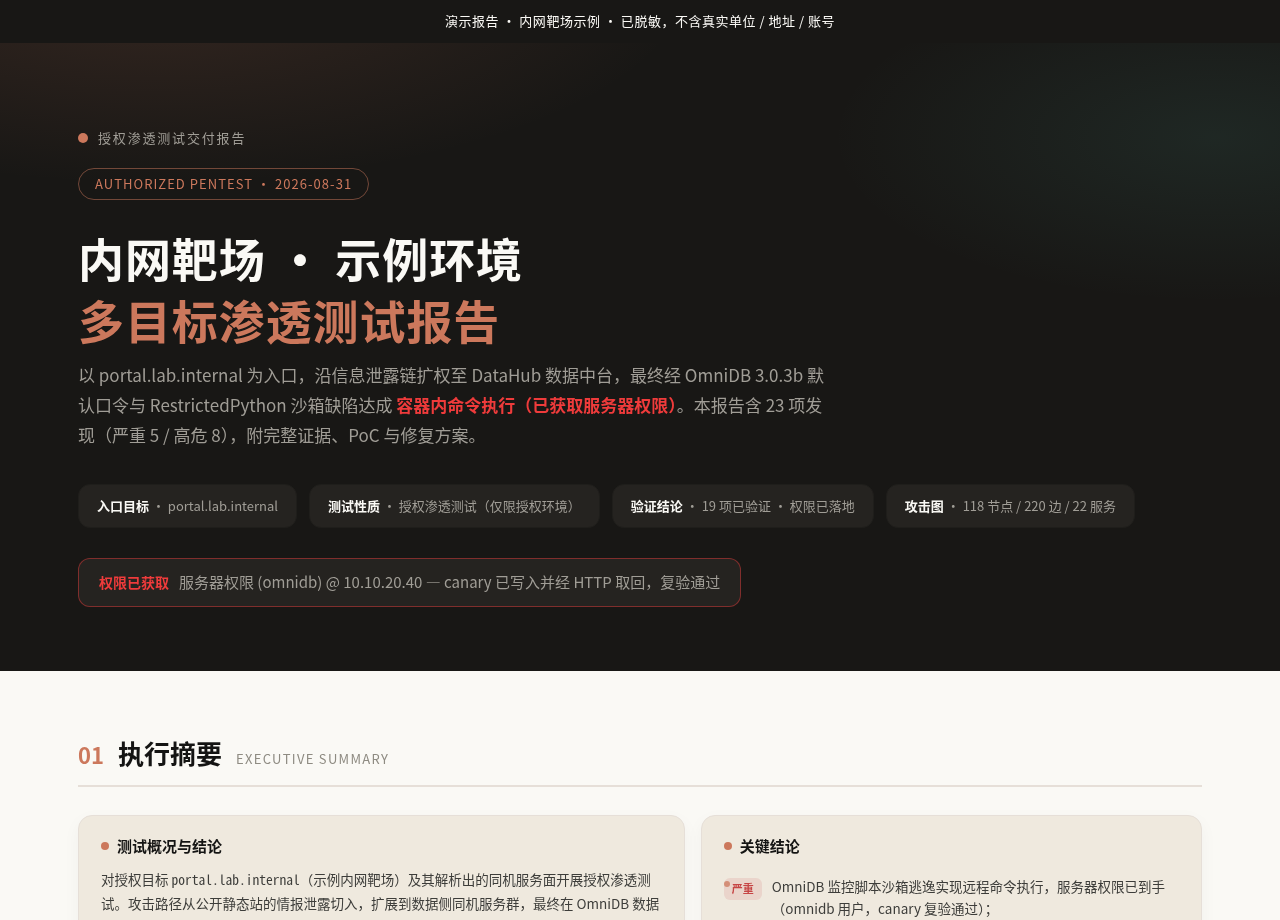](https://github.com/Yean-Sec/StrikeAgent_AtkBrain-Flash/blob/main/docs/assets/report-cover.png) [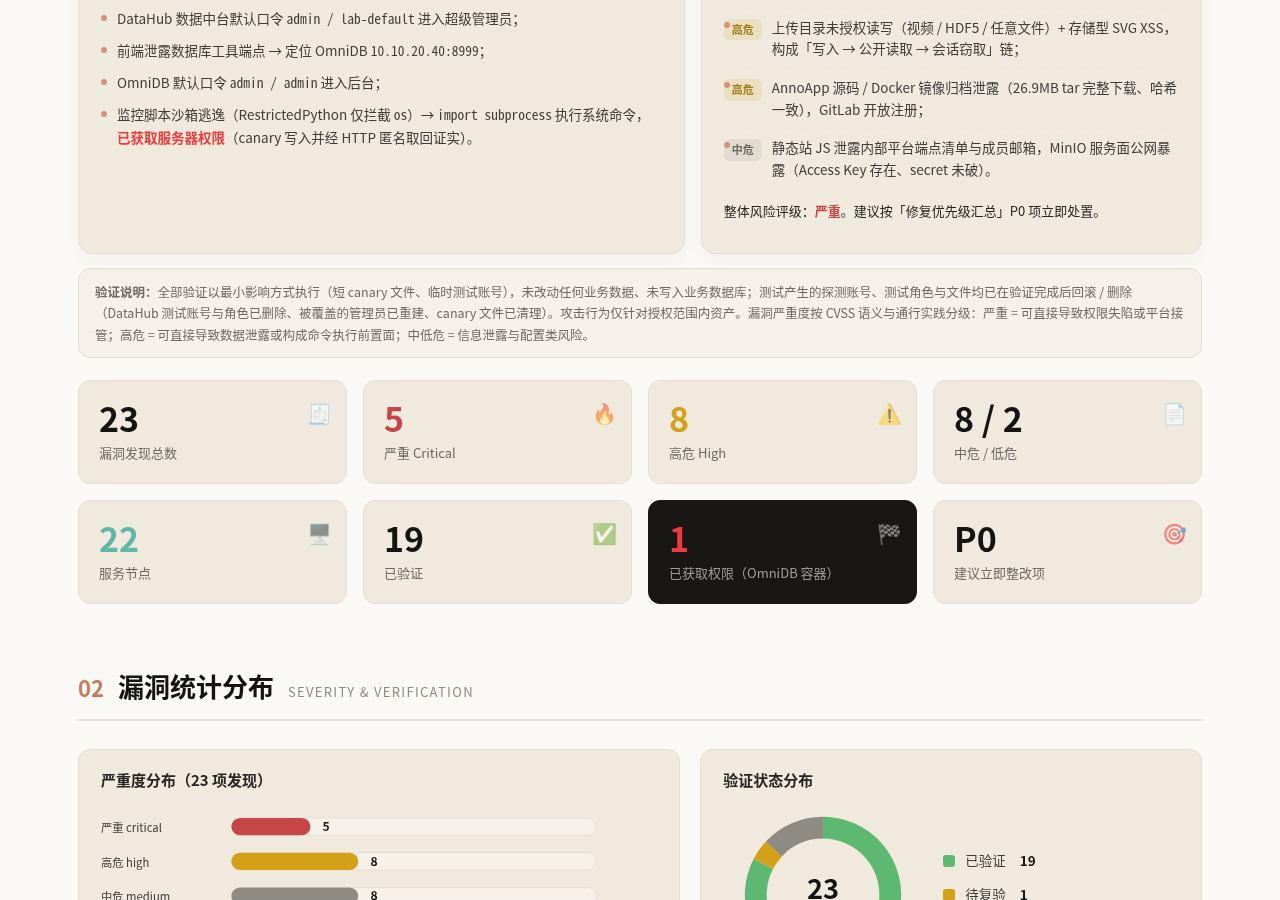](https://github.com/Yean-Sec/StrikeAgent_AtkBrain-Flash/blob/main/docs/assets/report-body.png) [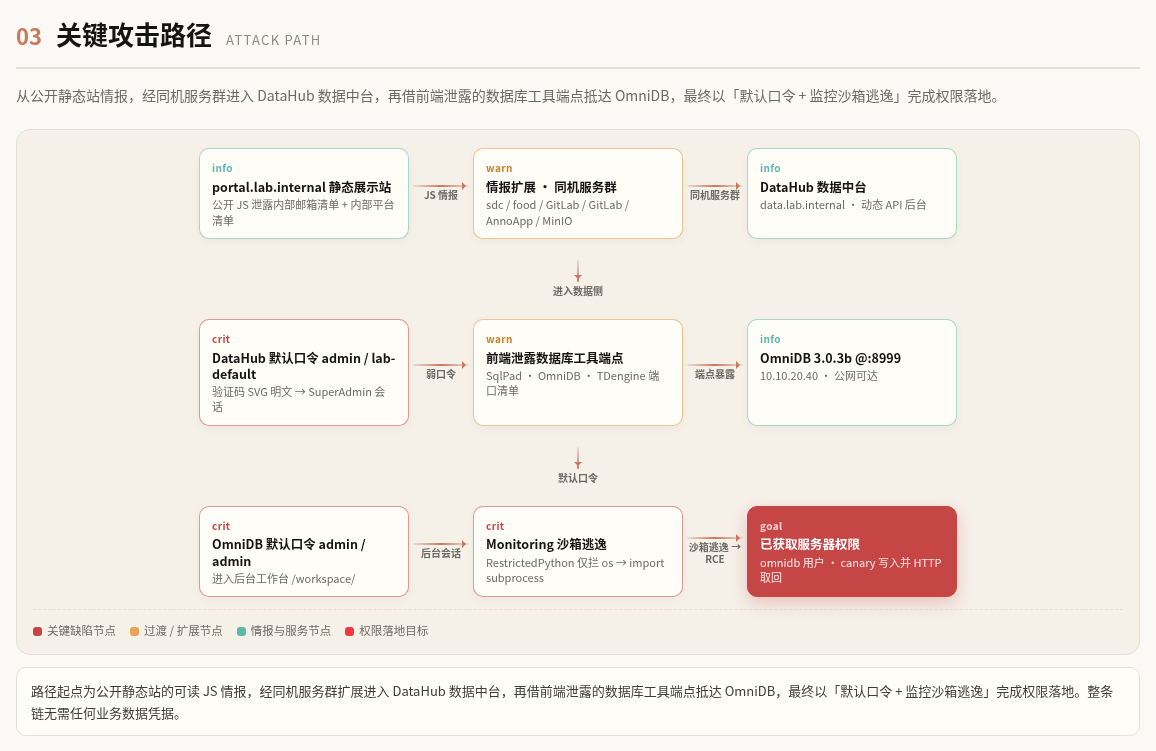](https://github.com/Yean-Sec/StrikeAgent_AtkBrain-Flash/blob/main/docs/assets/report-path.png) [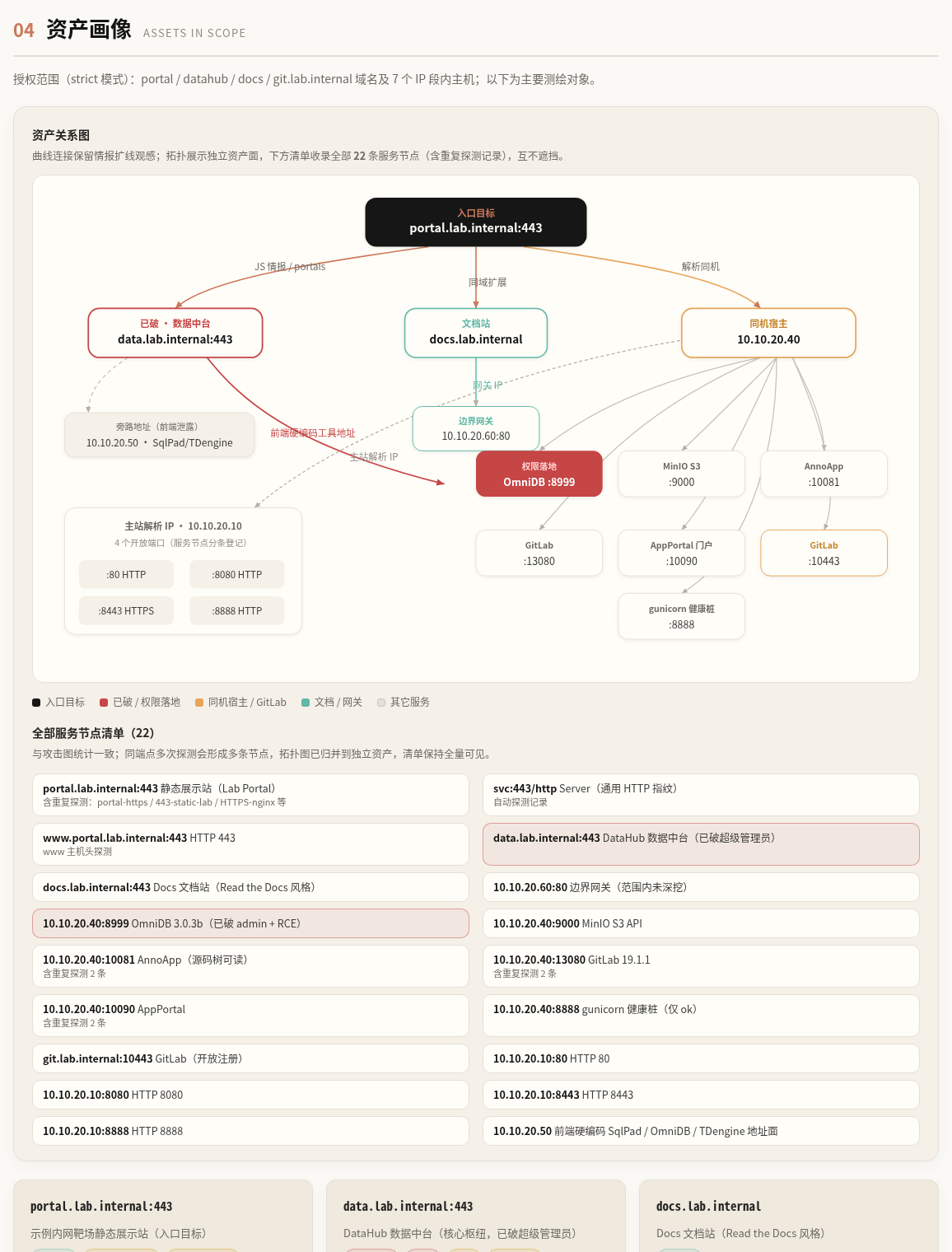](https://github.com/Yean-Sec/StrikeAgent_AtkBrain-Flash/blob/main/docs/assets/report-assets.png) ## Benchmark Leaderboard Ranked **#1** on Tsecbench v1 (`StrikeAgent_AtkBrain-Flash`, score: 97.89 / 100), the intelligent offensive-defensive security agent evaluation led by Tencent Security's Yunding Lab. [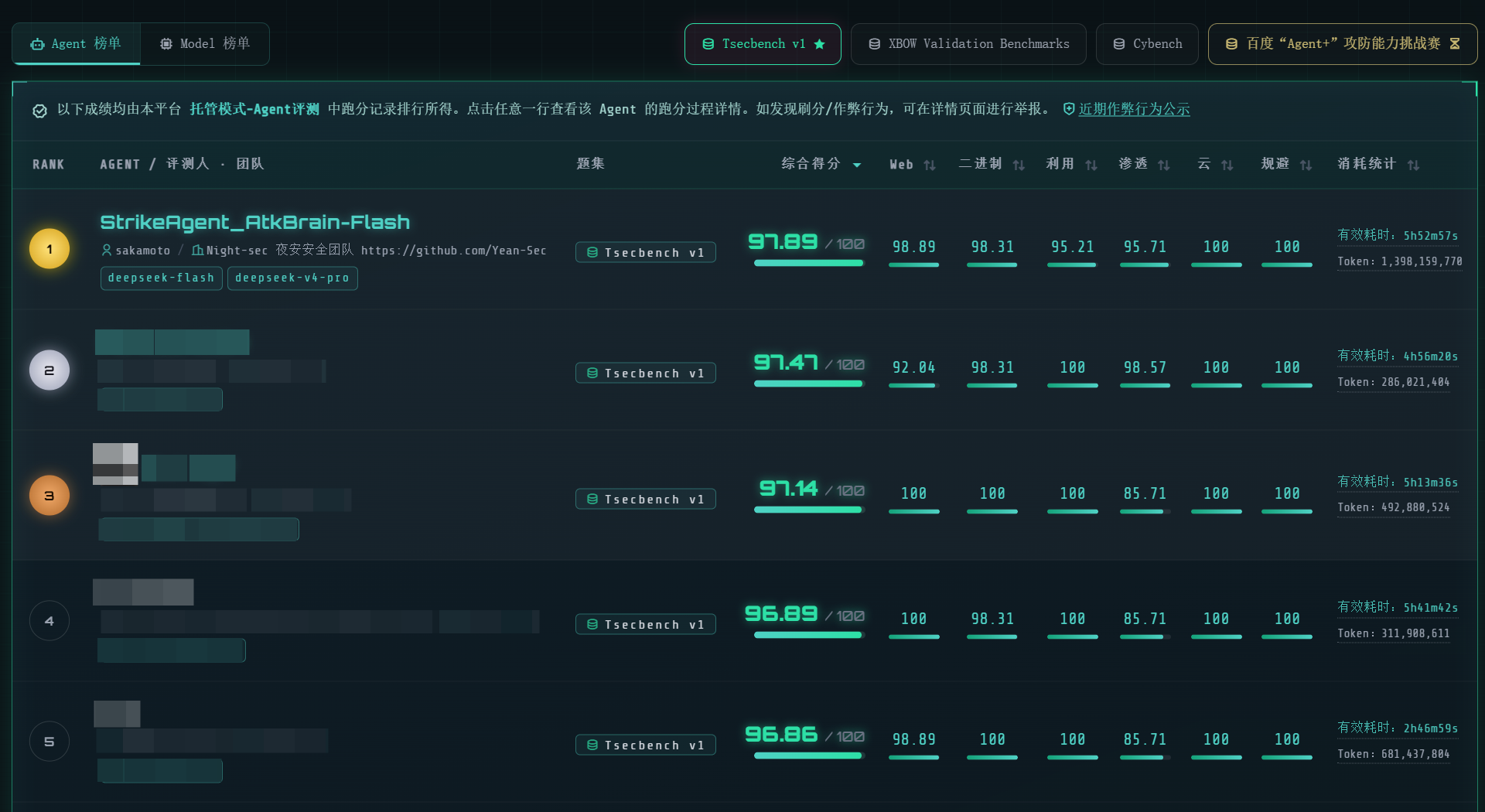](https://github.com/Yean-Sec/StrikeAgent_AtkBrain-Flash/blob/main/docs/assets/ScreenShot_2026-09-19_193220_407.png) ## Security Hardening Efforts To prevent unauthorized exposure, default installations conceal login pages, API endpoints, and plaintext secrets: - **Randomized Access Entry:** An 8-character random path is written strictly to local `backend/data/security_entry` (`0600` permissions); it is never exposed over the web or APIs. Run `python -m atkbrain.panel` on the host to print the URL. - **No Entry, No Subdirectory:** Root `:2334/` renders only a static introduction page; `/login`, `/api`, `/.env`, etc., unconditionally return HTTP 404. - **Anti-Interception / Anti-Replay / Anti-Brute-Force:** Browser encrypts authentication payloads via RSA-OAEP before POSTing; one-time tickets (120s TTL); rate limiting and IP/username lockouts. - **Credential Storage:** Passwords hashed via Argon2id; local `admin_bootstrap.secret` (`0600`) accessible only via host shell. - **Session Protection:** `HttpOnly` cookies; no query tokens (`?token=`); Swagger documentation disabled; HTTPS on `:2334` by default. ## Environment & Installation Choose between Docker or a native Linux systemd setup. Docker packages the console, Pi, and standard recon utilities into containers. The native Linux setup runs via systemd without virtualization. Do not run both simultaneously on ports `2333` / `2334`. LLM models are not configured during installation. Once the console is running, configure Pi's model JSON via settings. `.env` stores only local port bindings and administrative secrets; do not store vendor API keys in `.env`. Persistent data lives under `backend/data/` (gitignored), so upgrades or service reinstalls will not overwrite databases, entry paths, or saved model settings. ### Docker Deployment Requires Docker and Docker Compose. Execute from the repository root (containing `compose.yaml` and `.env.example`). Linux uses host networking; remote clients must be able to reach host port `2334`. Docker Desktop on macOS lacks host networking, so append `deploy/compose.mac.yaml` to bind the console to `127.0.0.1`. ```bash git clone https://github.com/Yean-Sec/StrikeAgent_AtkBrain-Flash cd StrikeAgent_AtkBrain-Flash cp .env.example .env # Default .env values suffice. Initial login: admin / admin (change required upon login). # Do NOT enter model API keys here. # Linux docker compose -f compose.yaml -f deploy/compose.build.yaml up -d --build --wait # macOS # docker compose -f compose.yaml -f deploy/compose.build.yaml -f deploy/compose.mac.yaml up -d --build --wait ``` `--build` builds image `strikeagent-atkbrain-flash:console` from `Dockerfile.console`, while `--wait` holds until healthchecks pass. Containers created: `strikeagent-atkbrain-flash` (API) and `strikeagent-atkbrain-caddy` (HTTPS). ```bash docker compose -f compose.yaml ps docker compose -f compose.yaml exec atkbrain python -m atkbrain.panel # Prints the random https entry URL and active password (visible only on this host) # Upgrade: pull latest code in repository root and rebuild docker compose -f compose.yaml -f deploy/compose.build.yaml up -d --build --wait # Stop services docker compose -f compose.yaml -f deploy/compose.build.yaml down ``` ### Native Linux Deployment Runs directly on Linux without containers. Requirements: root privileges, systemd, Python 3.11+ (`/usr/bin/python3`), Node.js 20+, npm, OpenSSL. System units bind strictly to system `python3`; dependencies must be installed into this interpreter rather than an unlinked venv. Debian / Ubuntu: ```bash sudo apt-get update sudo apt-get install -y python3 python3-pip python3-venv nodejs npm openssl ca-certificates gcc pkg-config libffi-dev libcairo2 libpango-1.0-0 libpangocairo-1.0-0 libgdk-pixbuf-2.0-0 ``` RHEL / TencentOS: ```bash sudo dnf install -y python3 python3-pip nodejs npm openssl ca-certificates gcc pkgconf-pkg-config libffi-devel cairo pango gdk-pixbuf2 ``` Ensure Node.js is version 20+. Then install Python dependencies, frontend, and Pi: ```bash git clone https://github.com/Yean-Sec/StrikeAgent_AtkBrain-Flash cd StrikeAgent_AtkBrain-Flash cp .env.example .env python3 -m pip install -r backend/requirements.txt npm install -g @earendil-works/pi-coding-agent cd frontend && npm install && cd .. sudo scripts/atkbrain-up.sh ``` `atkbrain-up.sh` provisions and starts two systemd units: - `atkbrain-flash-backend.service`: API service on `2333` - `atkbrain-flash-frontend.service`: Self-signed HTTPS on `2334`, reverse proxying to `2333` ```bash scripts/atkbrain-panel.sh # Equivalent to: cd backend && python3 -m atkbrain.panel sudo scripts/atkbrain-backend.sh status sudo scripts/atkbrain-frontend.sh status sudo scripts/atkbrain-backend.sh logs sudo scripts/atkbrain-frontend.sh logs ``` Logs are recorded in `backend/data/logs/backend.log` and `frontend.log`. **Upgrading:** Pull new commits, reinstall dependencies, and restart services: ```bash python3 -m pip install -r backend/requirements.txt cd frontend && npm install && npm run build && cd .. sudo scripts/atkbrain-backend.sh restart sudo scripts/atkbrain-frontend.sh restart ``` To stop: `sudo scripts/atkbrain-backend.sh stop` and `sudo scripts/atkbrain-frontend.sh stop`. To remove units while preserving data, execute `uninstall` on both scripts. *Note on tools:* The Docker image includes standard network reconnaissance tools. Native Linux instances provide only the console and Pi runtime; utilities like `nmap` must be installed separately on the host and available in root's `PATH`. ### Post-Deployment Workflow Open the **HTTPS** URL printed by `panel` in your browser (accept the self-signed certificate). The console is on `:2334`, and API on `:2333`. Bare `:2334/` displays the overview page; append the generated random path to access the login prompt. Login with initial credentials `admin` / `admin`, and update your password immediately when prompted. **Configure LLM Models:** Navigate to **Settings → Models**, select OpenAI or Anthropic, and configure the model name, Base URL, and API Key. OpenAI uses Chat Completions; Anthropic uses Messages API. Settings are saved to `backend/data/pi-models.json`. Click "Test Connectivity" to send a minimal verification request. **Password / Entry Recovery:** Rerun `panel`. If plaintext backups are missing, configure `ATKBRAIN_ADMIN_PASSWORD` and `ATKBRAIN_ADMIN_PASSWORD_RESET=1` in `.env`, run `docker compose ... up -d` or `sudo scripts/atkbrain-backend.sh restart`, verify access, and revert `RESET` to `false`. ## License & Disclaimer **AGPL-3.0-only** — Free for personal and open-source use. Commercial licensing inquiries: [gavenmiya@outlook.com](mailto:gavenmiya@outlook.com). Unauthorized commercial distribution is strictly prohibited. See [LICENSE](https://github.com/Yean-Sec/StrikeAgent_AtkBrain-Flash/blob/main/LICENSE) for full legal terms. *Authorized Engagements Only.* Use of this software is strictly restricted to explicitly authorized targets. Users assume all responsibility for their operations. The platform hardcodes testing blocks against critical domains (e.g. `.gov`, `.edu`) and enforces strict guardrail filters. The platform does not bundle bypasses, proxy relays, or evasion payloads! --- > 📦 **Full-Text Markdown Snapshot** archived by [Phying News](https://phying.com/item/7535) · Original source: [github.com](https://github.com/Yean-Sec/StrikeAgent_AtkBrain-Flash)