Cato VPN Client: Split-Tunnel and Privilege Escalation (CVE-2026-10739)
Summary
- CVE
- CVE-2026-10739
- Published
- Collected
📦 Full-Text Content Snapshot
R2 Archive · Full Article PreservedAuthor: Lucas Laise · Published: October 1, 2026 · Source: blog.quarkslab.com
Local privilege escalation in the Cato VPN Client through the split-tunnel upload flow, from named pipe to SYSTEM delete and Windows Installer rollback.
Introduction
During a Purple Team engagement, we had to list and rank risky components across the network. One of them caught our attention: Cato Client, a VPN client program. It was installed everywhere. It runs privileged services. It talks to a GUI. It handles network configuration. From an attacker perspective, this is exactly the kind of software you want to understand. However, saying "this looks risky" is not enough. There is nothing better than PoC||GTFO. So the question was simple: can we find a real bug and turn it into something useful? This is how it started. And then my teammate sent me this message:
💬 YV: "I have a new target for you. It has everything you like: named pipes, protobuf and .NET."
He knows me well. That sounds like a fun challenge.
This writeup covers a local privilege escalation in Cato Client. The bug starts in the split-tunnel upload feature, goes through a named pipe, and ends up with a SYSTEM shell.
🧨 CVE-2026-10739
Cato Networks SDP Client for Windows is vulnerable to Local Privilege Escalation. Confirmed on versions
6.2.0and6.4.6on Windows. From vendor:any version before 6.12.6.
Cato & Split Tunnel
Cato Client is the endpoint client used to connect users to Cato Cloud.
One feature is split tunneling. Cato documentation explains that administrators can let users upload a text file to decide which IP ranges are included or excluded from the encrypted tunnel. The file contains an include or exclude mode, followed by IP ranges and masks.
In the client UI, this feature appears as a local upload for the split tunnel configuration.
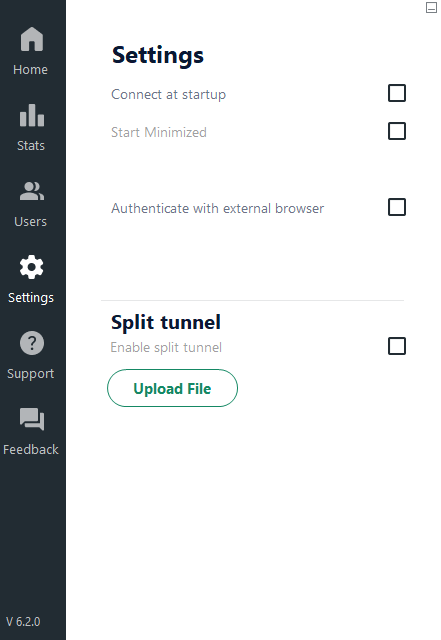
Cato Client settings - split tunnel file upload.
A minimal valid .ccst file looks like this:
include
10.10.10.0/24
Walkthrough
Discovery
The first useful observation came from a normal upload. When a valid CCST file is uploaded, the client accepts it and the (privileged) backend creates split-tunnel state (.stp) under ProgramData.

Valid CCST upload.
So I tried the opposite: upload a file with invalid CCST content. The parser rejects it. That part is normal. But the cleanup path is more interesting: the generated split-tunnel file is deleted.
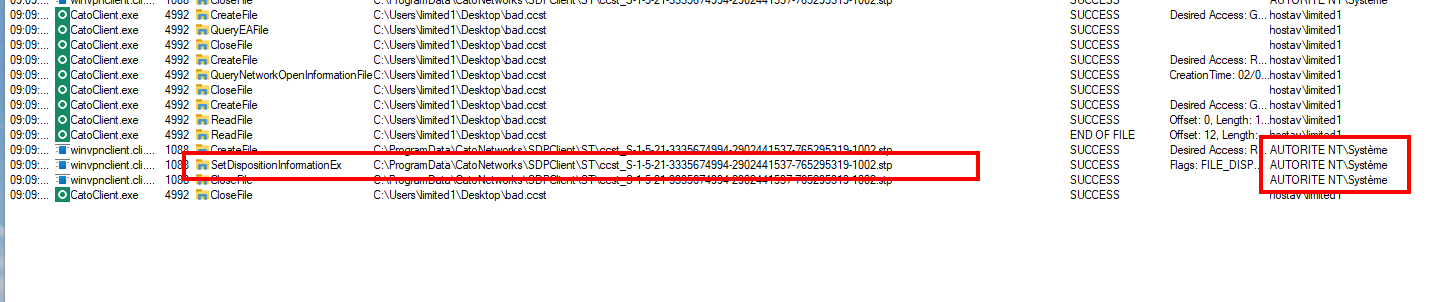
Invalid CCST upload. The generated file is cleaned up.
At this point, it is not yet a vulnerability. A privileged process deleting its own temporary file is not enough. Moreover, the destination directory has sane permissions. A limited user cannot just drop or replace things there:
PS C:\ProgramData\CatoNetworks\SDPClient> icacls .\ST\
.\ST\ AUTORITE NT\Système:(I)(F)
      AUTORITE NT\Système:(I)(OI)(CI)(IO)(M,WDAC,WO,GR,GW,DC)
      BUILTIN\Administrateurs:(I)(F)
      BUILTIN\Administrateurs:(I)(OI)(CI)(IO)(M,WDAC,WO,GR,GW,DC)
      BUILTIN\Utilisateurs:(I)(R)
      BUILTIN\Utilisateurs:(I)(OI)(CI)(IO)(R,GR)
As there was no easy win in filesystem permissions, the next question was: how does the low-privileged GUI ask the SYSTEM process to parse and delete those files?
Named pipe time
Our internal named pipe tool showed the answer: local IPC over a named pipe.
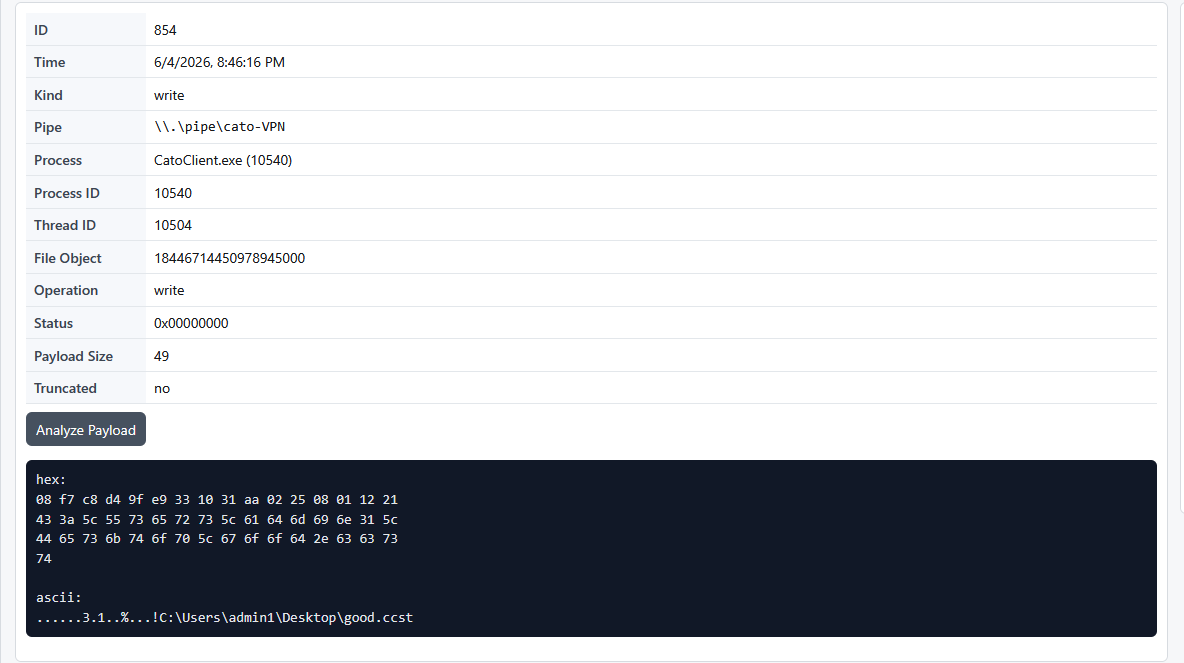
Cato GUI talks to the service through a named pipe.
The pipe is:
\\.\pipe\cato-VPNThe service-side process observed during the proof was:
C:\Program Files (x86)\Cato Networks\Cato Client\winvpnclient.cli.exeand it runs as:
NT AUTHORITY\SYSTEMA low-privileged process asks a SYSTEM process to parse a local file and delete cleanup artifacts.
However, direct access failed. Sending commands from a random process to the pipe did not work. With the help of Ghidra, we can see the named-pipe server checks the process talking to it:
GetNamedPipeClientProcessId(...);
GetNamedPipeClientSessionId(...);
The callback checks if IPC certificate validation is enabled. If yes, it resolves the executable path from the connecting PID, then verifies the executable certificate:
cVar2 = FUN_1401e5f20(...); // certificate check enabled?
if (cVar2 != '\0') {
    FUN_140767200(local_88, ..., client_pid);
    cVar2 = thunk_FUN_140753b80(local_88, expected_cert, ...);
    if (cVar2 == '\0') {
        "%s: Failed to register client. Could not verify client certificate. Close connection.";
        FUN_14076fc50(...); // close pipe
    }
}
FUN_140767200 resolves the client image path:
hProcess = OpenProcess(0x1000, 0, client_pid);
QueryFullProcessImageNameW(hProcess, 0, local_248, &local_294);
The verification helper then parses the executable signature and compares certificate material:
FUN_1407589d0(...);
FUN_140758aa0(...);
...
iVar2 = memcmp(_Buf1, expected_cert_material, size);
Conclusion: a random process does not pass this check. The pipe connection needs to originate from a process image signed with the expected Cato certificate, unless certificate checking is disabled by configuration.
Bypassing the certificate check
In the K7 writeup, the patch also tried to block random clients from talking to a privileged named pipe. Manual mapping a payload into a signed/trusted process was enough to get back inside the IPC path.
Same idea here:
- The PoC starts a signed Cato process:
C:\Program Files (x86)\Cato Networks\Cato Client\CatoClient.exe. - It manually maps a DLL payload into it.
- The DLL connects to
\\.\pipe\cato-VPN.
From the service point of view, the connection comes from a Cato-signed executable, bypassing the certificate check.
Protobuf Structure
The Cato GUI ships generated Google.Protobuf classes under CatoCommon. Decompiling ServiceCommunication.cs reveals how the client builds messages:
private void sendUiRegisterCommand()
{
    ClientToService clientToService = CreateBasicMessage(ClientToService.Types.Commands.UiRegister);
    clientToService.UiRegister = new C2sUiRegister
    {
        UiProcessId = _processId,
        UiSessionId = _sessionId,
        UserSidString = _userSidString,
        AadUserUpn = _aadUserUpn
    };
    SendCommand(clientToService);
}

public void UploadSplitTunnelFile(string filePath, bool enabled)
{
    ClientToService clientToService = CreateBasicMessage(ClientToService.Types.Commands.SplitTunnelUpload);
    clientToService.UploadStFile = new C2sUploadSplitTunnelFile
    {
        Filepath = filePath,
        Enabled = enabled
    };
    SendCommand(clientToService);
}
Field numbers and enums from generated Protobuf classes:
C2sUiRegister:UiProcessId = 1,UiSessionId = 2,UserSidString = 3C2sUploadSplitTunnelFile:Enabled = 1,Filepath = 2ClientToService.Commands:UiRegister = 34,SplitTunnelUpload = 49,LocalSplitTunnelEnable = 50
The C payload source code is available here: CatoPipePayload.c.
The bug
The .stp file is built using a user SID. However, this value is not derived from the real client token; it is taken directly from the user-controlled Protobuf message inside the named pipe (UserSidString).
The generated split-tunnel output path is formatted as:
<split-tunnel-storage>\ccst_<client supplied SID>.stpThe SID is treated as a safe filename component, but ..\ path components are not rejected. A payload can register with:
\\..\\..\\..\\..\\..\\..\\tmp\\foobarThe service builds the path, Windows normalizes the traversal, and the file resolves to C:\tmp\foobar.stp.
This provides two primitives:
- With a valid CCST file: arbitrary file write as
SYSTEM, with a forced.stpsuffix. - With an invalid CCST file: arbitrary file delete of the generated
.stppath asSYSTEM.
From delete to SYSTEM
The cleanup path is reached when the uploaded CCST file is readable but invalid. The execution flow:
- Signed
CatoClient.exeprocess origin cato-VPNnamed pipe certificate gate passesUiRegisterwith attacker-controlledUserSidStringUserSidStringreused inccst_<SID>.stp- Path traversal escapes the split-tunnel directory
SplitTunnelUploadpoints to an invalid CCST file- Parser fails
- Cleanup deletes the generated
.stppath asSYSTEM
To turn this into arbitrary delete, we redirect the .stp deletion via symbolic links / junctions using the C:\Config.Msi Windows Installer rollback technique (documented by ZDI):
C:\poc -> \RPC Control
\RPC Control\deleteme.stp -> \??\C:\Config.Msi
The malicious SID points the generated path to C:\poc\deleteme.stp. When Cato cleanup deletes that path as SYSTEM, it deletes C:\Config.Msi.
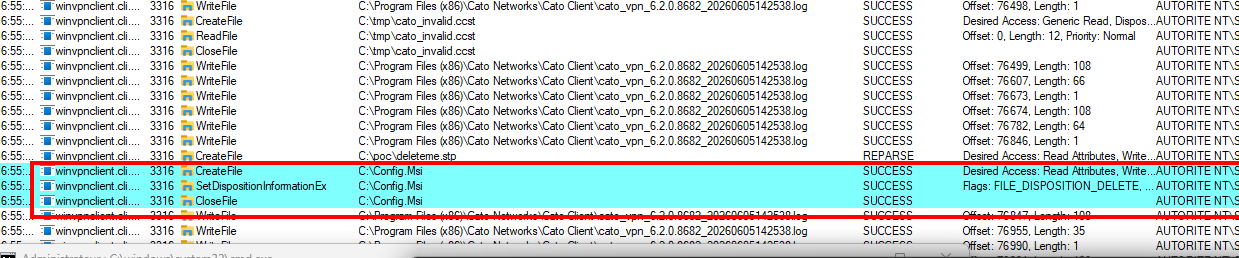
After that, the Windows Installer rollback chain gives code execution as SYSTEM.
Autonomous Proof of Concept
The final PoC is an autonomous wrapper:
- Prepares Windows Installer rollback state under
C:\Config.Msi. - Creates the
C:\poc\deleteme.stp -> C:\Config.Msijunction redirection. - Manually maps the embedded Cato pipe DLL into signed
CatoClient.exe. - Triggers split-tunnel upload cleanup with invalid CCST input.
- Waits for
C:\Config.Msito be deleted bywinvpnclient.cli.exeasSYSTEM. - Runs the second MSI stage and launches the configured command as
SYSTEM.
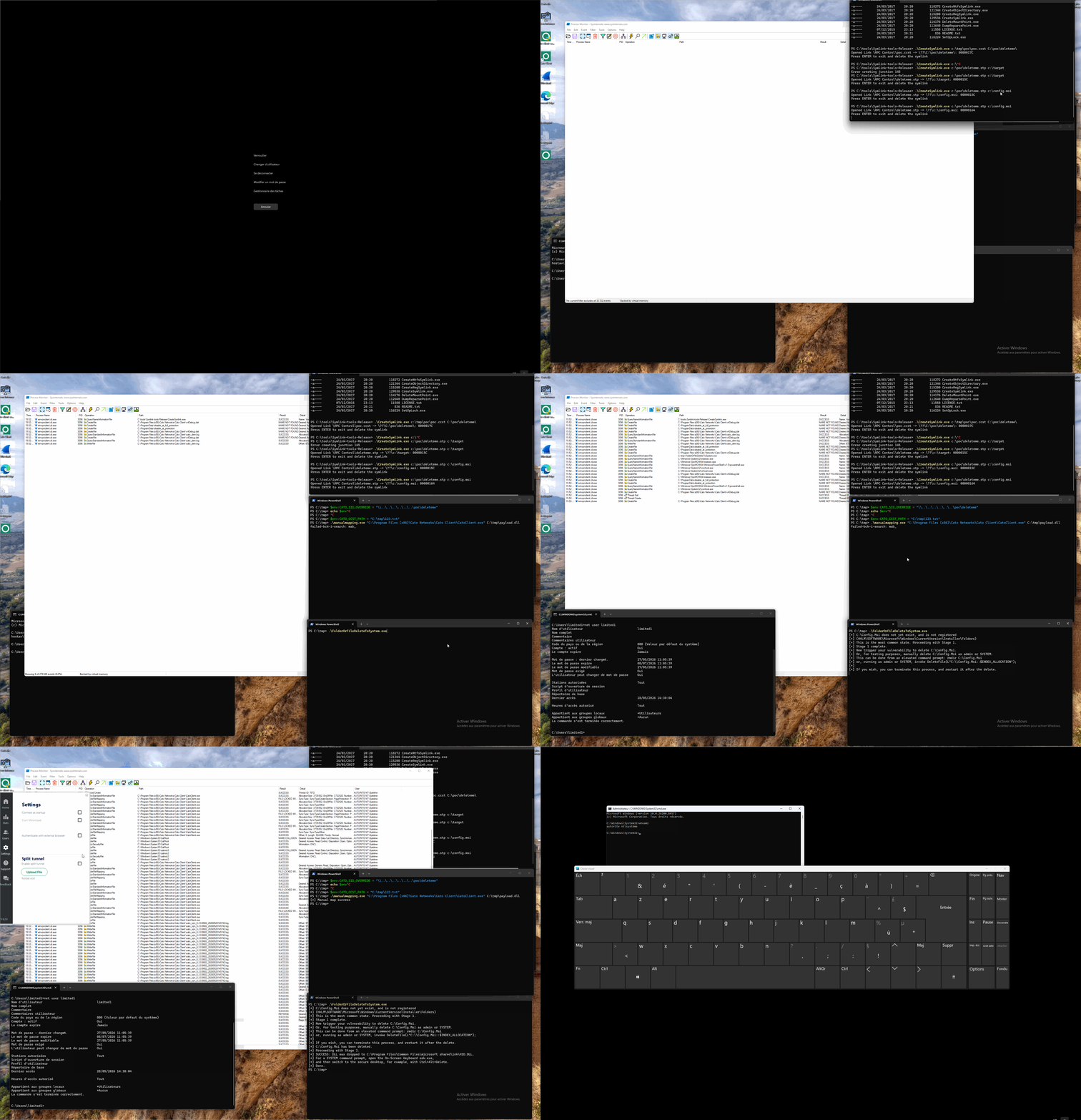
First LPE PoC.
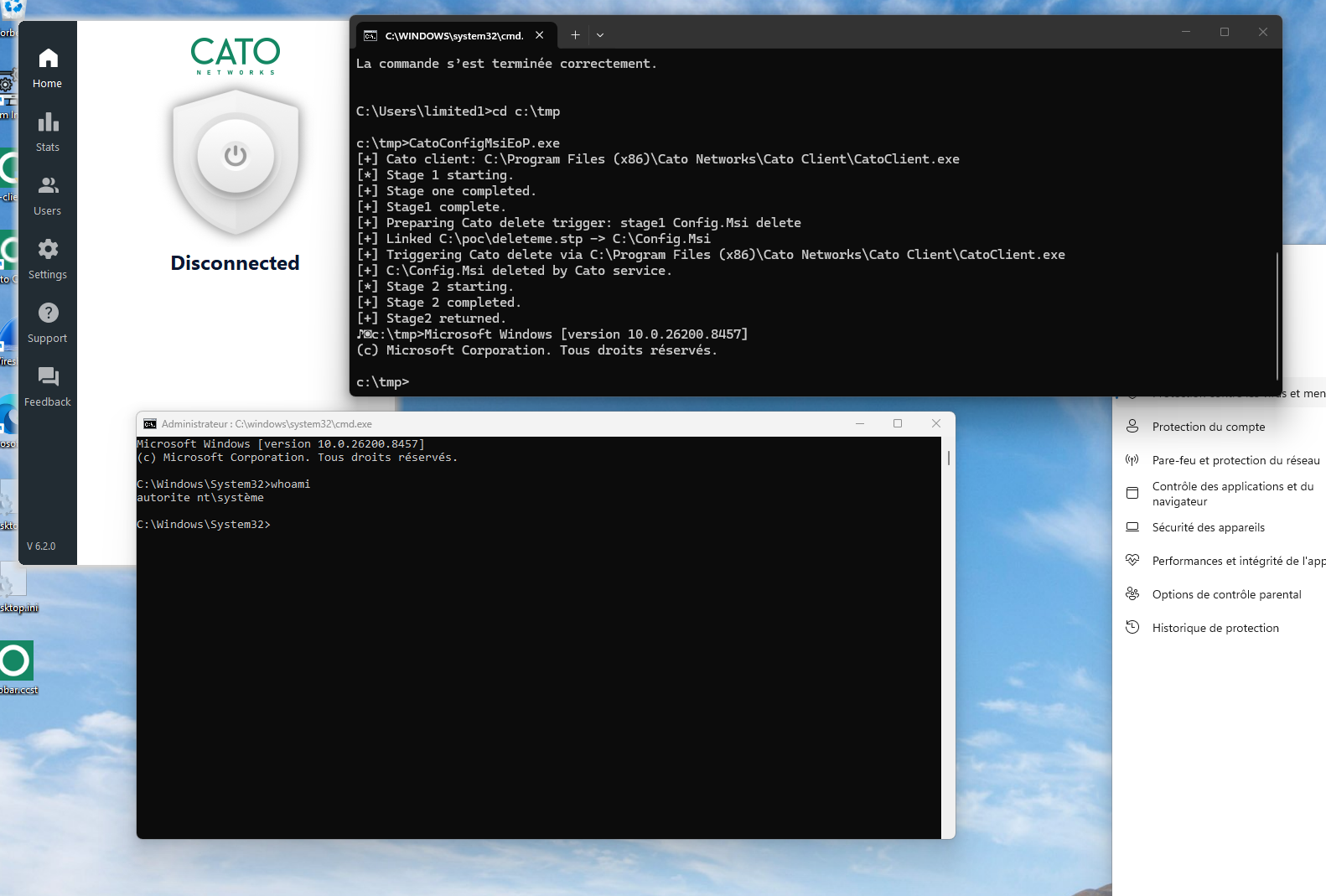
SYSTEM shell after the Cato delete and MSI rollback chain.
Video demonstration: CatoEOP.mp4
Conclusion
This exploit chained several subtle components:
- Signed process origin
- SID path traversal over Protobuf IPC
- Invalid CCST cleanup
- Privileged
SYSTEMdelete operation - Symlink redirection to
C:\Config.Msi SYSTEMshell via Windows Installer rollback
Disclosure Timeline
- 2026-06-02: Quarkslab reported the vulnerability to Cato Networks.
- 2026-06-03: Vendor acknowledged report.
- 2026-06-15: Quarkslab requested update; vendor replied pending engineering remediation.
- 2026-08-06: Quarkslab requested timeline; vendor replied fixed internally, rollout planned for late August.
- 2026-09-16: Quarkslab requested release date for coordinated disclosure.
- 2026-09-29: Quarkslab inquired about CVE assignment.
- 2026-09-30: Vendor confirmed CVE-2026-10739 and published Security Announcement.
- 2026-10-01: Blog post published.
References
- CVE-2026-10739 (cve.org)
- Cato Networks Security Announcement
- Cato Networks Split Tunnel Policy
- GitHub - CVE-2025-48799 PoC Reference
- CatoPipePayload.c Source
- ZDI: Abusing Arbitrary File Deletes to Escalate Privilege
📦 Full-Text Markdown Snapshot archived by Phying News · Original source: blog.quarkslab.com
---
id: 8922
canonical_url: "https://phying.com/item/8922"
title: "Cato VPN Client: Split-Tunnel and Privilege Escalation (CVE-2026-10739)"
type: "vulnerability"
cve: "CVE-2026-10739"
cvss: null
severity: "high"
vendor: "Cato Networks"
product: "Cato Client (Windows)"
affected_versions: "< 6.12.6"
source_domain: "blog.quarkslab.com"
source_url: "https://blog.quarkslab.com/cato-vpn-client-split-tunnel-and-privilege-escalation-cve-2026-10739.html"
published_at: "2026-10-01T00:00:00Z"
snapshot_at: "2026-10-26T05:55:00Z"
archived_by: "Phying News (https://phying.com/item/8922)"
lang: "en"
---
# Cato VPN Client: Split-Tunnel and Privilege Escalation (CVE-2026-10739)
*Author: Lucas Laise · Published: October 1, 2026 · Source: [blog.quarkslab.com](https://blog.quarkslab.com/cato-vpn-client-split-tunnel-and-privilege-escalation-cve-2026-10739.html)*
> Local privilege escalation in the Cato VPN Client through the split-tunnel upload flow, from named pipe to SYSTEM delete and Windows Installer rollback.
---
# Introduction
During a Purple Team engagement, we had to list and rank risky components across the network. One of them caught our attention: Cato Client, a VPN client program. It was installed everywhere. It runs privileged services. It talks to a GUI. It handles network configuration. From an attacker perspective, this is exactly the kind of software you want to understand. However, saying "this looks risky" is not enough. There is nothing better than `PoC||GTFO`. So the question was simple: can we find a real bug and turn it into something useful? This is how it started. And then [my teammate](https://blog.quarkslab.com/author/yv.html) sent me this message:
> 💬 YV: *"I have a new target for you. It has everything you like: named pipes, protobuf and .NET."*
He knows me well. That sounds like a fun challenge.
This writeup covers a local privilege escalation in Cato Client. The bug starts in the split-tunnel upload feature, goes through a named pipe, and ends up with a `SYSTEM` shell.
> 🧨 **CVE-2026-10739**
>
> Cato Networks SDP Client for Windows is vulnerable to Local Privilege Escalation.
> Confirmed on versions `6.2.0` and `6.4.6` on Windows. From vendor: `any version before 6.12.6`.
# Cato & Split Tunnel
[Cato Client](https://www.catonetworks.com/) is the endpoint client used to connect users to Cato Cloud.
One feature is split tunneling. [Cato documentation](https://support.catonetworks.com/hc/en-us/articles/16007802440349-Routing-with-the-Cato-Client-Split-Tunnel-Policy) explains that administrators can let users upload a text file to decide which IP ranges are included or excluded from the encrypted tunnel. The file contains an `include` or `exclude` mode, followed by IP ranges and masks.
In the client UI, this feature appears as a local upload for the split tunnel configuration.

*Cato Client settings - split tunnel file upload.*
A minimal valid `.ccst` file looks like this:
```text
include
10.10.10.0/24
```
# Walkthrough
## Discovery
The first useful observation came from a normal upload. When a valid CCST file is uploaded, the client accepts it and the (privileged) backend creates split-tunnel state (`.stp`) under `ProgramData`.

*Valid CCST upload.*
So I tried the opposite: upload a file with invalid CCST content. The parser rejects it. That part is normal. But the cleanup path is more interesting: the generated split-tunnel file is deleted.

*Invalid CCST upload. The generated file is cleaned up.*
At this point, it is not yet a vulnerability. A privileged process deleting its own temporary file is not enough. Moreover, the destination directory has sane permissions. A limited user cannot just drop or replace things there:
```powershell
PS C:\ProgramData\CatoNetworks\SDPClient> icacls .\ST\
.\ST\ AUTORITE NT\Système:(I)(F)
AUTORITE NT\Système:(I)(OI)(CI)(IO)(M,WDAC,WO,GR,GW,DC)
BUILTIN\Administrateurs:(I)(F)
BUILTIN\Administrateurs:(I)(OI)(CI)(IO)(M,WDAC,WO,GR,GW,DC)
BUILTIN\Utilisateurs:(I)(R)
BUILTIN\Utilisateurs:(I)(OI)(CI)(IO)(R,GR)
```
As there was no easy win in filesystem permissions, the next question was: how does the low-privileged GUI ask the `SYSTEM` process to parse and delete those files?
## Named pipe time
Our internal named pipe tool showed the answer: local IPC over a named pipe.

*Cato GUI talks to the service through a named pipe.*
The pipe is:
```text
\\.\pipe\cato-VPN
```
The service-side process observed during the proof was:
```text
C:\Program Files (x86)\Cato Networks\Cato Client\winvpnclient.cli.exe
```
and it runs as:
```text
NT AUTHORITY\SYSTEM
```
A low-privileged process asks a `SYSTEM` process to parse a local file and delete cleanup artifacts.
However, direct access failed. Sending commands from a random process to the pipe did not work. With the help of Ghidra, we can see the named-pipe server checks the process talking to it:
```c
GetNamedPipeClientProcessId(...);
GetNamedPipeClientSessionId(...);
```
The callback checks if IPC certificate validation is enabled. If yes, it resolves the executable path from the connecting PID, then verifies the executable certificate:
```c
cVar2 = FUN_1401e5f20(...); // certificate check enabled?
if (cVar2 != '\0') {
FUN_140767200(local_88, ..., client_pid);
cVar2 = thunk_FUN_140753b80(local_88, expected_cert, ...);
if (cVar2 == '\0') {
"%s: Failed to register client. Could not verify client certificate. Close connection.";
FUN_14076fc50(...); // close pipe
}
}
```
`FUN_140767200` resolves the client image path:
```c
hProcess = OpenProcess(0x1000, 0, client_pid);
QueryFullProcessImageNameW(hProcess, 0, local_248, &local_294);
```
The verification helper then parses the executable signature and compares certificate material:
```c
FUN_1407589d0(...);
FUN_140758aa0(...);
...
iVar2 = memcmp(_Buf1, expected_cert_material, size);
```
Conclusion: a random process does not pass this check. The pipe connection needs to originate from a process image signed with the expected Cato certificate, unless certificate checking is disabled by configuration.
## Bypassing the certificate check
In the [K7 writeup](https://blog.quarkslab.com/k7-antivirus-named-pipe-abuse-registry-manipulation-and-privilege-escalation.html), the patch also tried to block random clients from talking to a privileged named pipe. Manual mapping a payload into a signed/trusted process was enough to get back inside the IPC path.
Same idea here:
1. The PoC starts a signed Cato process: `C:\Program Files (x86)\Cato Networks\Cato Client\CatoClient.exe`.
2. It manually maps a DLL payload into it.
3. The DLL connects to `\\.\pipe\cato-VPN`.
From the service point of view, the connection comes from a Cato-signed executable, bypassing the certificate check.
## Protobuf Structure
The Cato GUI ships generated Google.Protobuf classes under `CatoCommon`. Decompiling `ServiceCommunication.cs` reveals how the client builds messages:
```csharp
private void sendUiRegisterCommand()
{
ClientToService clientToService = CreateBasicMessage(ClientToService.Types.Commands.UiRegister);
clientToService.UiRegister = new C2sUiRegister
{
UiProcessId = _processId,
UiSessionId = _sessionId,
UserSidString = _userSidString,
AadUserUpn = _aadUserUpn
};
SendCommand(clientToService);
}
public void UploadSplitTunnelFile(string filePath, bool enabled)
{
ClientToService clientToService = CreateBasicMessage(ClientToService.Types.Commands.SplitTunnelUpload);
clientToService.UploadStFile = new C2sUploadSplitTunnelFile
{
Filepath = filePath,
Enabled = enabled
};
SendCommand(clientToService);
}
```
Field numbers and enums from generated Protobuf classes:
- `C2sUiRegister`: `UiProcessId = 1`, `UiSessionId = 2`, `UserSidString = 3`
- `C2sUploadSplitTunnelFile`: `Enabled = 1`, `Filepath = 2`
- `ClientToService.Commands`: `UiRegister = 34`, `SplitTunnelUpload = 49`, `LocalSplitTunnelEnable = 50`
The C payload source code is available here: [CatoPipePayload.c](https://blog.quarkslab.com/resources/2026-10-01_cato-client-lpe/CatoPipePayload.c).
## The bug
The `.stp` file is built using a user SID. However, this value is not derived from the real client token; it is taken directly from the user-controlled Protobuf message inside the named pipe (`UserSidString`).
The generated split-tunnel output path is formatted as:
```text
<split-tunnel-storage>\ccst_<client supplied SID>.stp
```
The SID is treated as a safe filename component, but `..\` path components are not rejected. A payload can register with:
```text
\\..\\..\\..\\..\\..\\..\\tmp\\foobar
```
The service builds the path, Windows normalizes the traversal, and the file resolves to `C:\tmp\foobar.stp`.
This provides two primitives:
- With a valid CCST file: arbitrary file write as `SYSTEM`, with a forced `.stp` suffix.
- With an invalid CCST file: arbitrary file delete of the generated `.stp` path as `SYSTEM`.
## From delete to SYSTEM
The cleanup path is reached when the uploaded CCST file is readable but invalid. The execution flow:
1. Signed `CatoClient.exe` process origin
2. `cato-VPN` named pipe certificate gate passes
3. `UiRegister` with attacker-controlled `UserSidString`
4. `UserSidString` reused in `ccst_<SID>.stp`
5. Path traversal escapes the split-tunnel directory
6. `SplitTunnelUpload` points to an invalid CCST file
7. Parser fails
8. Cleanup deletes the generated `.stp` path as `SYSTEM`
To turn this into arbitrary delete, we redirect the `.stp` deletion via symbolic links / junctions using the `C:\Config.Msi` Windows Installer rollback technique (documented by ZDI):
```text
C:\poc -> \RPC Control
\RPC Control\deleteme.stp -> \??\C:\Config.Msi
```
The malicious SID points the generated path to `C:\poc\deleteme.stp`. When Cato cleanup deletes that path as `SYSTEM`, it deletes `C:\Config.Msi`.

After that, the Windows Installer rollback chain gives code execution as `SYSTEM`.
## Autonomous Proof of Concept
The final PoC is an autonomous wrapper:
1. Prepares Windows Installer rollback state under `C:\Config.Msi`.
2. Creates the `C:\poc\deleteme.stp -> C:\Config.Msi` junction redirection.
3. Manually maps the embedded Cato pipe DLL into signed `CatoClient.exe`.
4. Triggers split-tunnel upload cleanup with invalid CCST input.
5. Waits for `C:\Config.Msi` to be deleted by `winvpnclient.cli.exe` as `SYSTEM`.
6. Runs the second MSI stage and launches the configured command as `SYSTEM`.

*First LPE PoC.*

*SYSTEM shell after the Cato delete and MSI rollback chain.*
Video demonstration: [CatoEOP.mp4](https://blog.quarkslab.com/resources/2026-10-01_cato-client-lpe/CatoEOP.mp4)
# Conclusion
This exploit chained several subtle components:
1. Signed process origin
2. SID path traversal over Protobuf IPC
3. Invalid CCST cleanup
4. Privileged `SYSTEM` delete operation
5. Symlink redirection to `C:\Config.Msi`
6. `SYSTEM` shell via Windows Installer rollback
# Disclosure Timeline
- **2026-06-02**: Quarkslab reported the vulnerability to Cato Networks.
- **2026-06-03**: Vendor acknowledged report.
- **2026-06-15**: Quarkslab requested update; vendor replied pending engineering remediation.
- **2026-08-06**: Quarkslab requested timeline; vendor replied fixed internally, rollout planned for late August.
- **2026-09-16**: Quarkslab requested release date for coordinated disclosure.
- **2026-09-29**: Quarkslab inquired about CVE assignment.
- **2026-09-30**: Vendor confirmed [CVE-2026-10739](https://www.cve.org/CVERecord?id=CVE-2026-10739) and published [Security Announcement](https://knowledge.catonetworks.com/docs/cve-2026-10726-cve-2026-10739-impacts-windows-client-versions-lower-than-6126).
- **2026-10-01**: Blog post published.
# References
- [CVE-2026-10739 (cve.org)](https://www.cve.org/CVERecord?id=CVE-2026-10739)
- [Cato Networks Security Announcement](https://knowledge.catonetworks.com/docs/cve-2026-10726-cve-2026-10739-impacts-windows-client-versions-lower-than-6126)
- [Cato Networks Split Tunnel Policy](https://support.catonetworks.com/hc/en-us/articles/16007802440349-Routing-with-the-Cato-Client-Split-Tunnel-Policy)
- [GitHub - CVE-2025-48799 PoC Reference](https://github.com/Wh04m1001/CVE-2025-48799)
- [CatoPipePayload.c Source](https://blog.quarkslab.com/resources/2026-10-01_cato-client-lpe/CatoPipePayload.c)
- [ZDI: Abusing Arbitrary File Deletes to Escalate Privilege](https://www.zerodayinitiative.com/blog/2022/3/16/abusing-arbitrary-file-deletes-to-escalate-privilege-and-other-great-tricks)
---
> 📦 **Full-Text Markdown Snapshot** archived by [Phying News](https://phying.com/item/8922) · Original source: [blog.quarkslab.com](https://blog.quarkslab.com/cato-vpn-client-split-tunnel-and-privilege-escalation-cve-2026-10739.html)